Local Business Schema: Step-by-Step Implementation Guide
 Anna Novak
A local business schema markup tells search engines exactly what kind of physical-presence entity a page describes — name, address, phone, hours, geo, ratings — in machine-readable JSON-LD. For brick-and-mortar operators, multi-location franchises, and service-area businesses, this structured data is the cleanest way to feed Google, Bing, and emerging AI search the facts that drive map packs, knowledge panels, and rich results.
This guide walks through every step: choosing the right subtype, modelling required and recommended properties, handling addresses and opening hours, deploying the markup in static HTML, WordPress, and headless stacks, and validating the result. Examples use the https://schema.org vocabulary and the JSON-LD format that Google explicitly recommends.
What LocalBusiness Schema Is (and Why Local Search Treats It Specially)
The LocalBusiness type is a child of Organization and Place in the Schema.org vocabulary. In other words, it inherits both organisational identity and physical-location semantics. That dual heritage is exactly why it powers local search features that pure Organization markup cannot trigger.
Search engines combine three signals to rank local results: relevance, distance, and prominence. Structured data primarily strengthens the first and the third. When a page declares a LocalBusiness with consistent NAP data, geo-coordinates, and verified reviews, crawlers can disambiguate the entity, link it to a Google Business Profile, and surface it confidently in the local pack.
Without this markup, Google still attempts entity extraction from page text — but the result is fuzzier. Specifically, addresses parsed from free-form HTML are treated as low-confidence signals. Therefore, the practical payoff of well-formed local business schema is fewer ambiguity errors and faster indexing of new locations.
LocalBusiness Subtypes (Restaurant, Hotel, Store — Pick the Most Specific)
Schema.org defines roughly 70 direct subtypes of LocalBusiness. For example, a corner cafe should declare CafeOrCoffeeShop, not the generic parent. The more specific the type, the better the match with vertical-specific result formats.
| Business category | Recommended @type | Notes |
|---|---|---|
| Restaurant or cafe | Restaurant or CafeOrCoffeeShop |
Eligible for menu rich results |
| Hotel or B&B | Hotel, BedAndBreakfast |
Eligible for hotel pricing rich results |
| Retail shop | Store or specific (BookStore, ClothingStore) |
Pair with Product markup for inventory |
| Medical practice | Dentist, Physician, MedicalClinic |
YMYL category — accuracy is critical |
| Professional services | LegalService, AccountingService, FinancialService |
Often paired with Service markup |
| Auto repair / dealership | AutoRepair, AutoDealer |
Supports OfferCatalog for service packages |
| Service-area business | Most specific subtype + areaServed |
Use when there is no walk-in storefront |
If no specific type fits, fall back to LocalBusiness directly. Conversely, do not invent multi-type stacks like ["LocalBusiness", "ProfessionalService", "Plumber"] unless every parent is genuinely accurate. Multiple types are valid, but each one widens the eligibility criteria Google may apply.
Required Properties: name, address, telephone, openingHours
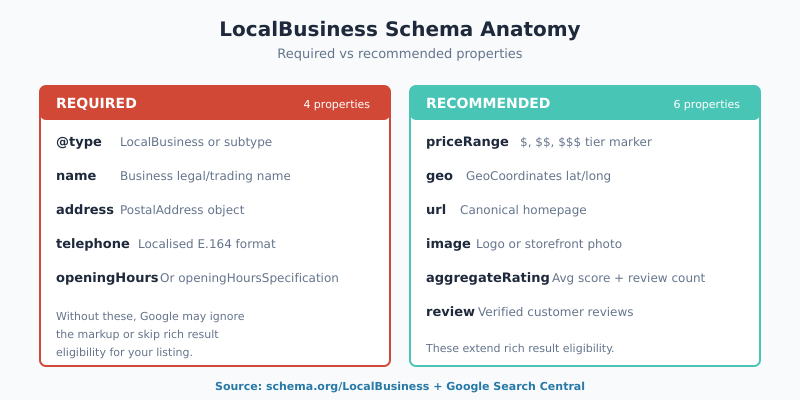
Google’s Search Central documentation lists four properties as the baseline for any local business entity: name, address, telephone, and openingHours (or its richer cousin openingHoursSpecification). Without these four, the markup either gets rejected or offers no incremental value over plain HTML.
{
  "@context": "https://schema.org",
  "@type": "Restaurant",
  "name": "Anna's Bakery Ltd",
  "address": {
    "@type": "PostalAddress",
    "streetAddress": "221B Baker Street",
    "addressLocality": "London",
    "postalCode": "NW1 6XE",
    "addressCountry": "GB"
  },
  "telephone": "+44 20 7946 0958",
  "openingHours": "Mo-Fr 08:00-18:00, Sa 09:00-14:00"
}
A few specifics deserve attention. First, name should match the legal or trading name registered on the Google Business Profile — not a marketing slogan. Second, telephone works best in E.164 format with a leading + and country code. Third, openingHours uses two-letter day codes (Mo, Tu, We, Th, Fr, Sa, Su) and 24-hour times.
Recommended Properties: priceRange, geo, aggregateRating, review
Beyond the required four, several recommended properties materially improve eligibility for richer SERP features. Specifically, geo with GeoCoordinates helps disambiguate locations in dense urban areas where addresses overlap floors or units. Furthermore, aggregateRating and review can drive the star rating displayed beside the business name in search results — provided the reviews are first-party and verifiable.
{
  "@context": "https://schema.org",
  "@type": "Restaurant",
  "name": "Anna's Bakery Ltd",
  "image": "https://annasbakery.example/storefront.jpg",
  "url": "https://annasbakery.example/",
  "priceRange": "$$",
  "geo": {
    "@type": "GeoCoordinates",
    "latitude": 51.523767,
    "longitude": -0.158555
  },
  "aggregateRating": {
    "@type": "AggregateRating",
    "ratingValue": "4.7",
    "reviewCount": "184"
  }
}
One caveat on reviews: Google’s policy disallows third-party aggregator reviews (Yelp, TripAdvisor) inside LocalBusiness markup. Only reviews collected and displayed on the business’s own domain qualify. Consequently, copying ratings from an external platform is a guaranteed manual action risk.
The Address Block: When PostalAddress Beats Free-form Text
A common mistake is using a string for address instead of a structured PostalAddress object. While Schema.org technically allows both, search engines parse the structured form much more reliably. Specifically, locality, region, and country codes resolve cleanly without geocoding heuristics.
| Pattern | Example | Verdict |
|---|---|---|
| Free-form string | "address": "221B Baker St, London NW1 6XE" |
Avoid |
| Partial PostalAddress | Object with streetAddress only |
Incomplete — fails GSC parsing |
| Full PostalAddress | Object with all five fields | Recommended |
| P.O. Box only | "streetAddress": "PO Box 1234" |
Disqualifies local pack eligibility |
| Service-area without storefront | Skip address, use areaServed + geo |
Correct for mobile services |
The five canonical fields are streetAddress, addressLocality (city), addressRegion (state or province), postalCode, and addressCountry. Country codes follow the ISO 3166-1 alpha-2 standard (GB, US, DE). Therefore, hard-coding “United Kingdom” instead of GB generates a validator warning, even if the value resolves correctly.
Opening Hours: openingHoursSpecification for Multiple Branches and Holidays
The compact openingHours string covers ordinary weekly schedules, but it cannot express holiday closures, special hours, or branch-specific timetables. For those cases, switch to the openingHoursSpecification array — each entry is its own OpeningHoursSpecification object with explicit days, opens and closes.
"openingHoursSpecification": [
  {
    "@type": "OpeningHoursSpecification",
    "dayOfWeek": ["Monday","Tuesday","Wednesday","Thursday","Friday"],
    "opens": "08:00",
    "closes": "18:00"
  },
  {
    "@type": "OpeningHoursSpecification",
    "dayOfWeek": "Saturday",
    "opens": "09:00",
    "closes": "14:00"
  },
  {
    "@type": "OpeningHoursSpecification",
    "validFrom": "2026-12-25",
    "validThrough": "2026-12-26",
    "opens": "00:00",
    "closes": "00:00"
  }
]
Notice the third entry: equal opens and closes values flag a closure window. Additionally, multi-location chains should expose hours per branch, ideally by emitting one LocalBusiness JSON-LD block per location landing page rather than one bloated block on the homepage.
Implementation: Static HTML, WordPress, Headless
The mechanics differ by stack, but the principle is identical: emit a JSON-LD <script> tag inside <head> on every URL that represents the entity. Below are three deployment patterns covering most realistic environments.
Static HTML or templated CMS
<script type="application/ld+json">
{
  "@context": "https://schema.org",
  "@type": "Store",
  "name": "Anna's Bakery Ltd",
  "address": { ... },
  "telephone": "+44 20 7946 0958",
  "openingHours": "Mo-Fr 08:00-18:00"
}
</script>
Drop the script directly into the location landing page template (the local business schema generator produces the block above from a form, with the subtype selector and address fields already in place). As a result, every rendered URL inherits the markup automatically. Avoid embedding it in the page body — many crawlers parse only <head>-level JSON-LD reliably.
WordPress with a local SEO plugin
Most active WordPress sites already run a structured-data plugin (Yoast SEO, Rank Math, Schema Pro). For instance, Yoast Local SEO maps fields from a custom location post type into a LocalBusiness JSON-LD block emitted on each location URL. This eliminates manual JSON authoring and keeps the markup synchronised with the dashboard data.
If no plugin is in place, a small functions.php hook works:
add_action('wp_head', function () {
  if (!is_page('contact')) return;
  $data = [
    '@context' => 'https://schema.org',
    '@type'    => 'Restaurant',
    'name'     => "Anna's Bakery Ltd",
    'address'  => [
      '@type'           => 'PostalAddress',
      'streetAddress'   => '221B Baker Street',
      'addressLocality' => 'London',
      'postalCode'      => 'NW1 6XE',
      'addressCountry'  => 'GB',
    ],
    'telephone'    => '+44 20 7946 0958',
    'openingHours' => 'Mo-Fr 08:00-18:00',
  ];
  echo '<script type="application/ld+json">' . wp_json_encode($data) . '</script>';
});
Headless (Next.js, Astro, similar)
In a headless React or static-site framework, render the JSON-LD inside the page’s <Head> component. The pattern mirrors any meta-tag injection. A useful detail: store the location data in a CMS or JSON file so a single source of truth feeds the markup, the visible address block on the page, and the Schema Markup Generator output during QA.
For a deeper dive into JSON-LD authoring patterns and rich-result types beyond local search, see the JSON-LD developer’s guide.
Connecting LocalBusiness Schema to Google Business Profile (NAP Consistency)
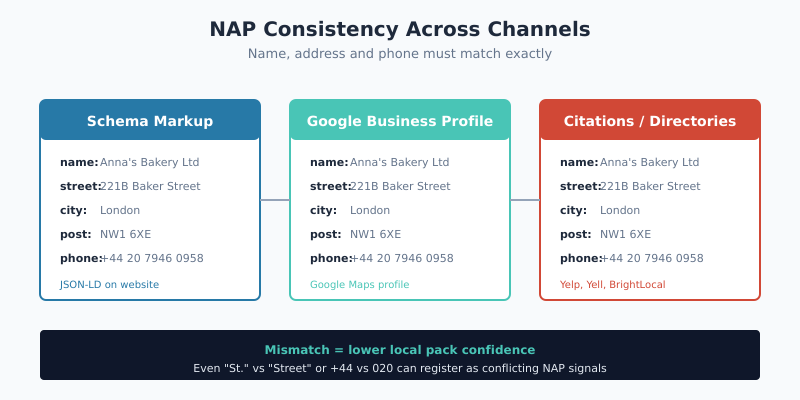
Schema markup and Google Business Profile are not redundant — they reinforce each other. The website declares the entity to search; the GBP listing claims and verifies it. When the two disagree, Google trusts the verified profile but penalises confidence in the markup.
Therefore, a clean integration follows three rules. First, name, address, and telephone must be byte-identical between the JSON-LD and the GBP listing. Second, sameAs can link the entity to its GBP URL, Wikipedia entry, social profiles, and Wikidata identifier. Third, the same NAP must appear consistently on third-party citations: Whitespark and BrightLocal both maintain audit tools for this.
"sameAs": [
  "https://www.google.com/maps/place/?q=place_id:ChIJxxxxxxxxxxxx",
  "https://www.facebook.com/annasbakery",
  "https://www.linkedin.com/company/annas-bakery"
]
For an introduction to the broader structured-data-for-SEO landscape, including non-local entity types, see the beginners guide on this site.
Validation: Rich Results Test, Schema Markup Validator, Google Search Console
Three validators belong in every implementation workflow. They overlap intentionally — each catches errors the others miss.
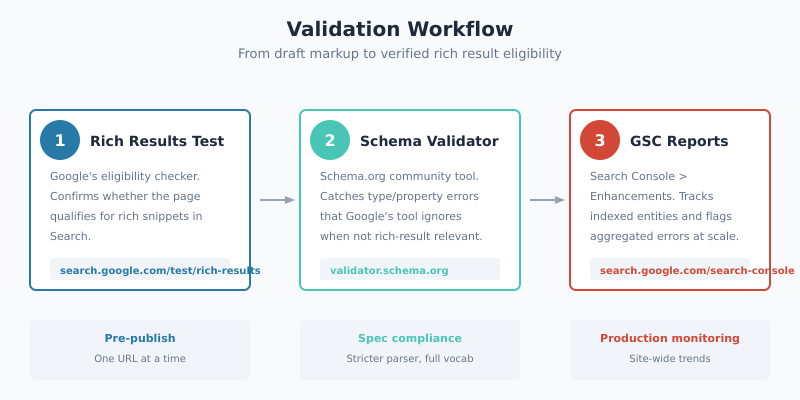
- Rich Results Test (
search.google.com/test/rich-results). Google’s own checker. It confirms whether the URL qualifies for any rich result format and previews how the result might render. Use it before pushing changes to production. - Schema Markup Validator (
validator.schema.org). The Schema.org community tool. It validates the full vocabulary, catches type and property mistakes that Google ignores, and explicitly checks for nested-type compatibility. - GSC Enhancements report. Once the markup is live, Search Console aggregates per-template errors across the site. This is the only one of the three that scales beyond URL-level testing — and the only one that surfaces post-deploy regressions.
For ongoing monitoring, established practitioners such as Aleyda Solis recommend pairing GSC with periodic Rich Results Test sweeps after major template changes. Manual spot-checks on three to five URLs catch CMS or plugin regressions early.
Common Mistakes (Single Block on Multi-Location Sites, Free-form Addresses, Conflicting NAP)
Most local business schema bugs cluster into a small set of repeat offenders. Above all, multi-location chains lose ranking opportunities by emitting one global LocalBusiness block on the homepage instead of branch-specific blocks per location URL. Each branch deserves its own page, its own markup, and its own Google Business Profile.
- Free-form address strings. Always use
PostalAddressobjects with discrete fields. Free-form strings parse unreliably. - Conflicting NAP between schema and GBP. Even small mismatches (“Street” vs “St.”, “+44 20” vs “020”) reduce confidence. Consequently, audit citations quarterly.
- Aggregator reviews inside markup. Google Search policy disallows reviews from third-party platforms in your own
LocalBusinessblocks — only first-party reviews qualify. - Generic @type when a specific subtype exists.
LocalBusinessis a fallback;Dentist,Plumber, orBookStoreare stronger semantic signals. - Missing or invalid country code. Use ISO 3166-1 alpha-2 (
GB,US), not “United Kingdom” or “USA”. - P.O. boxes as
streetAddress. These disqualify the listing from local pack eligibility entirely. - Stale opening hours. Holiday and special-hours markup should be reviewed at least seasonally — outdated hours undermine trust signals fast.
- Cross-site reuse of identical blocks. Each entity needs unique markup; copy-pasting blocks across unrelated business pages confuses entity resolution.
Bottom Line
Local business schema is not a vanity exercise. It compresses an entity’s identity into a format that crawlers and AI assistants ingest cleanly, with measurable downstream effects on map pack visibility, knowledge panels, and rich results. The required properties cost roughly fifteen minutes per location to author; the recommended ones add another twenty for full geo, ratings, and price-range coverage. Validation is free.
The shortest path to a clean implementation: pick the most specific @type, model the address as a PostalAddress, mirror NAP byte-for-byte with the Google Business Profile, validate with all three tools, and audit citations at least once a year. To accelerate the JSON authoring step, the Schema Markup Generator on this site produces compliant LocalBusiness blocks for any subtype — copy the output into the page head, validate, and ship.