Alternate Page With Proper Canonical Tag: What It Means
 Anna Novak

Alternate page with proper canonical tag is not an error. It appears in the “Why pages aren’t indexed” section of the Page indexing report, which is why it reads like a problem, but Google’s own documentation ends the description with a plain instruction: there is nothing you need to do.
The status means Google found a URL, saw that it points to a different canonical URL, confirmed that canonical is indexed, and filed the duplicate away without indexing it separately. That is canonicalisation working exactly as designed.
What follows is worth reading anyway, because the count in that row tells you something real about your site — just not what most people assume it does.
What Google’s documentation says
The Page Indexing report reference defines the status narrowly:
This page is marked as an alternate of another page (that is, an AMP page with a desktop canonical, or a mobile version of a desktop canonical, or the desktop version of a mobile canonical). This page correctly points to the canonical page, which is indexed, so there is nothing you need to do.
Every example in that definition belongs to a specific era of web development: AMP pages, and separate m-dot mobile sites. If you run neither — and most sites built in the last few years run neither — the definition seems not to apply to you at all.
Yet the row keeps filling up. The gap between the documented definition and observed behaviour is where the confusion lives.
Why the status appears on sites with no AMP at all
In practice Google applies this label to any URL that resolves successfully, declares a canonical pointing elsewhere, and gets consolidated into that target. Alternate versions of a page are far more numerous than AMP ever was.
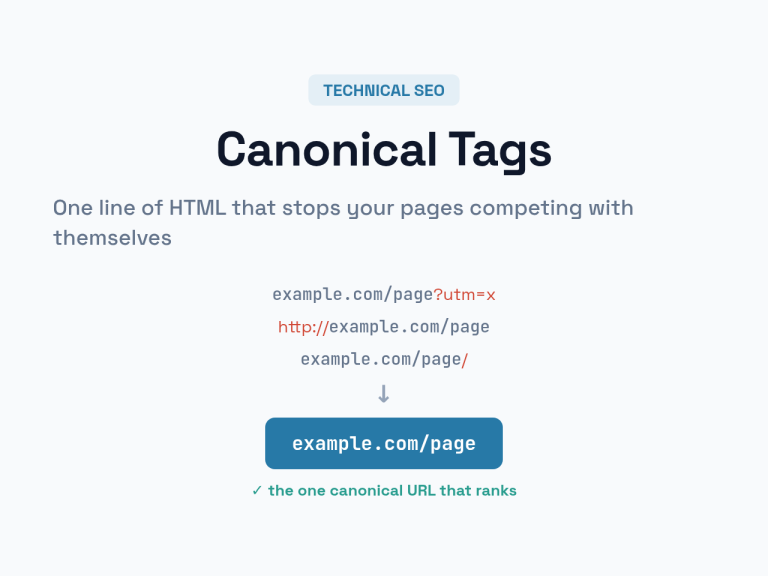
The everyday source is query parameters. To show what that looks like, I requested one of our own articles twice — once clean, once with a tracking parameter appended:
| Requested URL | Response | Canonical it declares |
|---|---|---|
/canonical-tags-guide-fixing-duplicate-content/ |
200 | itself |
/canonical-tags-guide-fixing-duplicate-content/?utm_source=test |
200 | the clean URL |
Both URLs return a live page. Both are crawlable. The second one honestly declares that it is a variant of the first. If Google crawls it, that URL lands in exactly this report row — no AMP involved.
The same shape arises from several ordinary sources:
- Campaign parameters on shared links —
utm_source,gclid,fbclid, affiliate identifiers - Session or filter parameters that produce the same content in a different order
- Product variant URLs on stores, where colour or size sits in the path or query
- Trailing-slash, uppercase or protocol variants that resolve rather than redirect
- Paginated comment URLs and reply links on WordPress installs that leave them open
All of these are handled correctly by a self-referencing canonical on the clean version and a pointing canonical on the variant. Which is why the status is, genuinely, a report of success.

The three canonical statuses are not equal
The report contains two more canonical-related rows, and those two do want your attention. Reading them as a set is the fastest way to know whether you have work to do.
| Status | What happened | Do you act? |
|---|---|---|
| Alternate page with proper canonical tag | The page declares a canonical, that canonical is indexed, Google agreed | No — this is the working state |
| Duplicate without user-selected canonical | Google found duplicates and picked one itself, because the page expressed no preference | Yes — declare a canonical explicitly, or make the content genuinely distinct |
| Duplicate, Google chose different canonical than user | You declared a canonical and Google overrode it | Yes — inspect both URLs and check how similar they really are |
The third row is the sharpest signal on the whole report. Google overriding a declared canonical usually means the two pages are less similar than you believed, or that the signals disagree — internal links, sitemap entries, redirects and hreflang all vote alongside the tag, and the tag is a hint rather than a directive. Our full guide to canonical tags covers how those signals interact.

When the count is worth investigating
The status needs no fixing. The volume behind it can still be a symptom, and there are two cases where I would look closer.
The first is scale. A few hundred alternate URLs on a site with a few hundred real pages is unremarkable. Tens of thousands of them, on a site with two hundred articles, says your site is generating URL variants far faster than it generates content. Every one of those variants is a crawl request spent on a page that will never be indexed. On a small site that costs nothing; on a large or slow one it competes with pages you want crawled.
The second is misplacement. Sort the sample URLs and read them. If a page you meant to rank appears in this row, the canonical on it is pointing somewhere you did not intend — a template default, a plugin setting applied site-wide, or a copied page that kept the original’s canonical. That is not the status misbehaving. That is the status correctly reporting a mistake in your markup.
Between those two cases, a stable count that grows in proportion to your traffic is background noise from campaign links, and the correct response is to leave it alone.

Checking a specific URL
Open the row, take a sample URL, and run it through URL Inspection. Two fields decide everything: the canonical you declared and the canonical Google selected.
When both fields show the same target and it is the page you wanted indexed, the system is working and the URL belongs where it is. When the user-declared canonical points somewhere unexpected, look at the page source — in most cases the tag was written by a template or a plugin rather than by anyone deliberately. When Google’s selection differs from yours, the two URLs are not as duplicate as you assumed, and the fix is content, not markup.
One habit saves a lot of time here: check whether the variant returns 200 at all. A parameter URL that could be redirected at the server rather than canonicalised in HTML never becomes a crawl candidate in the first place. Canonical tags consolidate ranking signals; redirects prevent the duplicate from existing. They solve overlapping problems at different costs.
Getting the tag right in the first place
Most canonical trouble traces back to a handful of habits, and all of them are cheap to adopt.
Give every indexable page a self-referencing canonical — a page that points at itself removes all ambiguity about what it is. Use absolute URLs, matching your live protocol and host exactly, since a relative canonical resolved against the wrong base is a common and invisible failure. Keep one canonical per page; two conflicting tags mean Google ignores both. And make sure the target of a canonical returns 200 rather than a redirect or a 404, because a canonical pointing at a URL that no longer exists throws away the consolidation you were trying to achieve.
If you are generating or auditing these by hand, our canonical URL generator normalises a URL and produces the tag in the correct form, which removes the two errors — relative paths and mismatched hosts — that cause most of the surprises in this report.
Frequently asked questions
Is “alternate page with proper canonical tag” bad for SEO?
No. It reports that a duplicate URL correctly points to an indexed canonical, and Google’s documentation states plainly that no action is needed. Ranking signals consolidate onto the canonical page.
Why do I see it when my site has no AMP pages?
Google’s definition lists AMP and m-dot examples, but the label applies to any URL that resolves and declares a canonical elsewhere. On modern sites the usual sources are campaign parameters, filter or session parameters, and product variant URLs.
Should I block these URLs in robots.txt?
Generally no. Blocking crawl prevents Google from seeing the canonical tag, which is what consolidates the duplicate in the first place. If a variant is genuinely worthless, redirect it at the server or stop linking to it rather than hiding it from the crawler.
How is it different from “duplicate without user-selected canonical”?
That status means the page declared no canonical at all, so Google picked one for you. It is worth fixing, because the choice is then out of your hands. The alternate-page status means you did declare one and Google honoured it.
Can this status hide a real indexing problem?
Only in one way: if a page you wanted indexed shows up in the row, its canonical is pointing somewhere you did not intend. Reading the sample URLs rather than only the count is what catches that.
What to check next
Note today’s count, open five sample URLs, and confirm that each one is a variant you recognise. If they are all parameter or filter URLs, close the report and spend the time elsewhere. If a real article is sitting among them, you have found something worth fixing — and it was never the status that was wrong.