Schema Markup for Beginners: How Structured Data Boosts SEO
 Anna Novak
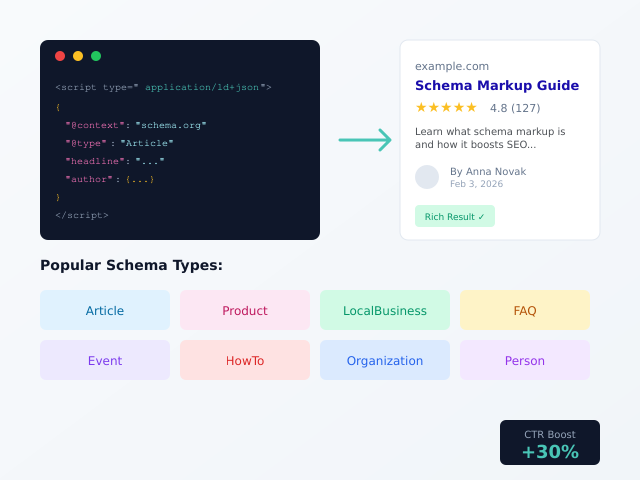
Schema markup is code that helps search engines understand your content better. When implemented correctly, it can transform ordinary search listings into rich results with star ratings, prices, images, and other eye-catching elements. These enhanced listings dramatically improve click-through rates and visibility in search results.
This guide explains schema markup in plain language. You’ll learn what structured data is, why it matters for SEO, and how to implement it on your website. By the end, you’ll understand how to use schema markup to gain a competitive edge in search results.
What Is Schema Markup?
Schema markup is a standardized vocabulary of tags that you add to your HTML. These tags tell search engines exactly what your content means, not just what it says. Think of it as a translation layer between your website and search engine crawlers.
For example, the word “Avatar” on a page could mean the movie, a profile picture, or a Hindu deity. Schema markup removes this ambiguity by explicitly declaring: “This is a movie titled Avatar, directed by James Cameron, released in 2009.”
The Schema.org Standard
Schema.org is the collaborative project behind schema markup. Founded in 2011 by Google, Bing, Yahoo, and Yandex, it provides a shared vocabulary that all major search engines understand. This standardization means you implement schema once and benefit across multiple search platforms.
The vocabulary includes hundreds of types covering virtually any content imaginable — articles, products, events, recipes, medical conditions, job postings, and much more. Each type has specific properties that describe its characteristics.
Why Schema Markup Matters for SEO
Schema markup provides several significant SEO advantages that compound over time.
Rich Results in Search
The most visible benefit is rich results — enhanced search listings that display additional information directly in search results. Depending on your content type, rich results might show:
- Star ratings: Product and business reviews displayed with rating stars
- Price information: Product prices shown directly in listings
- FAQ accordions: Expandable questions and answers in search results
- Recipe details: Cook time, calories, and images for recipes
- Event information: Dates, locations, and ticket availability
- How-to steps: Step-by-step instructions with images
Rich results occupy more visual space and attract more attention than standard listings. Studies show they can improve click-through rates by 20-30% compared to plain results.
Better Search Engine Understanding
Beyond rich results, schema markup helps search engines understand your content more accurately. This improved understanding can influence how your pages rank for relevant queries and which queries they appear for.
When Google confidently understands that your page discusses a specific product, person, or topic, it can match that page to searcher intent more precisely. This semantic understanding becomes increasingly important as search engines evolve beyond simple keyword matching.
Voice Search Optimization
Voice assistants like Google Assistant and Alexa rely heavily on structured data to answer spoken queries. When someone asks “What time does the nearest pharmacy close?” the assistant pulls that information from schema markup. Implementing local business schema makes your information accessible to voice search users.
Knowledge Graph Inclusion
Google’s Knowledge Graph — the information boxes that appear for entities like companies, people, and places — partially relies on schema markup. Proper implementation increases your chances of appearing in or influencing Knowledge Graph results for your brand or offerings.
Types of Schema Markup
Schema.org defines hundreds of types, but most websites only need a handful. Here are the most commonly used and impactful types.
Article Schema
Article schema applies to news articles, blog posts, and other editorial content. It tells search engines about the headline, author, publication date, and featured image.
Benefits include potential inclusion in Google’s Top Stories carousel and article-specific rich results showing publication information.
Product Schema
Product schema describes items for sale, including name, price, availability, brand, and reviews. E-commerce sites should implement product schema on every product page.
Rich results show price, availability status, and star ratings directly in search listings — powerful for driving purchase-ready traffic.
Local Business Schema
Local business schema provides information about physical business locations: address, phone number, hours of operation, and accepted payment methods.
This schema type is essential for local SEO, helping businesses appear in local pack results and Google Maps listings with complete, accurate information.
FAQ Schema
FAQ schema marks up question-and-answer content. When implemented, Google may display your FAQs as expandable accordions directly in search results.
This format significantly increases your listing’s visual footprint and click-through rate. Each FAQ can also rank independently for long-tail question queries.
How-To Schema
How-to schema structures step-by-step instructions. Google can display these as rich results with step numbers, images, and time estimates.
Tutorial content, DIY guides, and instructional articles benefit significantly from how-to markup.
Organization Schema
Organization schema provides information about your company: name, logo, contact information, and social media profiles. Implementing it helps establish your brand entity in Google’s understanding.
Person Schema
Person schema describes individuals — useful for author pages, team member profiles, and personal brand sites. Properties include name, job title, employer, and biographical information.
Event Schema
Event schema describes happenings with dates, locations, and ticket information. Concerts, conferences, webinars, and any time-bound gatherings benefit from event markup.
Rich results can show event dates, venue, and ticket purchase options directly in search.
Schema Markup Formats
You can implement schema markup in three formats. Each achieves the same result but differs in implementation approach.
JSON-LD (Recommended)
JSON-LD (JavaScript Object Notation for Linked Data) is Google’s preferred format. It uses a script block in your page’s head or body containing structured data in JSON format.
<script type="application/ld+json">
{
  "@context": "https://schema.org",
  "@type": "Article",
  "headline": "Schema Markup for Beginners",
  "author": {
    "@type": "Person",
    "name": "Anna Novak"
  },
  "datePublished": "2026-02-03"
}
</script>
JSON-LD advantages include:
- Separation from HTML: Doesn’t mix with your page content
- Easy maintenance: Update structured data without touching page markup
- Dynamic generation: Simple to generate programmatically
- Google’s preference: Explicitly recommended by Google
Microdata
Microdata embeds schema markup directly within HTML elements using special attributes like itemscope, itemtype, and itemprop.
<article itemscope itemtype="https://schema.org/Article">
  <h1 itemprop="headline">Schema Markup for Beginners</h1>
  <span itemprop="author">Anna Novak</span>
  <time itemprop="datePublished">2026-02-03</time>
</article>
Microdata works but requires modifying HTML structure. This makes it harder to maintain and more error-prone than JSON-LD.
RDFa
RDFa (Resource Description Framework in Attributes) also embeds markup in HTML using different attributes. It’s less common than the other formats and offers no advantages for most use cases.
For new implementations, always choose JSON-LD unless specific technical constraints require an alternative.
How to Implement Schema Markup
Implementing schema markup involves identifying the right types, generating the code, and validating your implementation.
Step 1: Identify Relevant Schema Types
Start by matching your content to appropriate schema types. Ask yourself:
- What is this page primarily about?
- What information would help searchers understand this content?
- Which rich results could apply to this content type?
Most pages need only one or two schema types. Don’t over-complicate by adding every possible type — focus on those that genuinely describe your content.
Step 2: Gather Required Properties
Each schema type has required and recommended properties. Check Google’s structured data documentation for specific requirements:
| Schema Type | Required Properties | Recommended Properties |
|---|---|---|
| Article | headline, image, datePublished, author | dateModified, publisher, description |
| Product | name, image, offers (with price, availability) | description, brand, review, aggregateRating |
| LocalBusiness | name, address | telephone, openingHours, geo, image |
| FAQ | mainEntity (with Question and Answer) | None |
| Event | name, startDate, location | endDate, image, description, offers |
Step 3: Generate the Code
You can write JSON-LD manually, but generators save time and reduce errors. Our Schema Markup Generator creates properly formatted JSON-LD for eight common types — just fill in your information and copy the code.
Step 4: Add Code to Your Page
Place the JSON-LD script in your page’s HTML. It can go in the head section or anywhere in the body. For WordPress sites, you can add it via your theme, a custom field, or an SEO plugin.
Step 5: Validate Your Implementation
Before publishing, verify your schema markup is error-free using these tools:
- Google’s Rich Results Test: Shows which rich results your page qualifies for
- Schema.org Validator: Checks general schema validity
- Google Search Console: Reports schema errors across your site
Fix any errors before relying on the markup. Invalid schema may be ignored entirely.
Schema Markup Examples
These complete examples show properly structured JSON-LD for common use cases.
Article Example
<script type="application/ld+json">
{
  "@context": "https://schema.org",
  "@type": "Article",
  "headline": "Schema Markup for Beginners: How Structured Data Boosts SEO",
  "image": "https://example.com/images/schema-guide.jpg",
  "author": {
    "@type": "Person",
    "name": "Anna Novak",
    "url": "https://example.com/author/anna-novak/"
  },
  "publisher": {
    "@type": "Organization",
    "name": "CleverUtils",
    "logo": {
      "@type": "ImageObject",
      "url": "https://example.com/logo.png"
    }
  },
  "datePublished": "2026-02-03",
  "dateModified": "2026-02-03",
  "description": "Learn what schema markup is, why it matters for SEO, and how to implement structured data on your website."
}
</script>
Local Business Example
<script type="application/ld+json">
{
  "@context": "https://schema.org",
  "@type": "LocalBusiness",
  "name": "Downtown Coffee House",
  "image": "https://example.com/images/storefront.jpg",
  "address": {
    "@type": "PostalAddress",
    "streetAddress": "123 Main Street",
    "addressLocality": "Portland",
    "addressRegion": "OR",
    "postalCode": "97201",
    "addressCountry": "US"
  },
  "telephone": "+1-503-555-0123",
  "openingHoursSpecification": [
    {
      "@type": "OpeningHoursSpecification",
      "dayOfWeek": ["Monday", "Tuesday", "Wednesday", "Thursday", "Friday"],
      "opens": "07:00",
      "closes": "19:00"
    },
    {
      "@type": "OpeningHoursSpecification",
      "dayOfWeek": ["Saturday", "Sunday"],
      "opens": "08:00",
      "closes": "17:00"
    }
  ],
  "priceRange": "$$"
}
</script>
FAQ Example
<script type="application/ld+json">
{
  "@context": "https://schema.org",
  "@type": "FAQPage",
  "mainEntity": [
    {
      "@type": "Question",
      "name": "What is schema markup?",
      "acceptedAnswer": {
        "@type": "Answer",
        "text": "Schema markup is code that helps search engines understand your content. It uses a standardized vocabulary from Schema.org to describe what your page is about."
      }
    },
    {
      "@type": "Question",
      "name": "Does schema markup help SEO?",
      "acceptedAnswer": {
        "@type": "Answer",
        "text": "Yes, schema markup helps SEO by enabling rich results in search, improving search engine understanding of your content, and increasing click-through rates."
      }
    }
  ]
}
</script>
Product Example
<script type="application/ld+json">
{
  "@context": "https://schema.org",
  "@type": "Product",
  "name": "Wireless Bluetooth Headphones",
  "image": "https://example.com/images/headphones.jpg",
  "description": "Premium wireless headphones with 40-hour battery life and active noise cancellation.",
  "brand": {
    "@type": "Brand",
    "name": "AudioTech"
  },
  "offers": {
    "@type": "Offer",
    "price": "149.99",
    "priceCurrency": "USD",
    "availability": "https://schema.org/InStock",
    "url": "https://example.com/products/wireless-headphones"
  },
  "aggregateRating": {
    "@type": "AggregateRating",
    "ratingValue": "4.7",
    "reviewCount": "283"
  }
}
</script>
Common Schema Markup Mistakes
Avoid these errors that can invalidate your markup or trigger penalties.
Marking Up Invisible Content
Schema must describe content visible to users. Marking up hidden content, content behind tabs users must click, or content that differs from what users see violates Google’s guidelines.
Fake or Misleading Data
Never add fake reviews, incorrect prices, or exaggerated ratings. Google can penalize sites using schema to deceive users. All structured data must accurately reflect page content.
Missing Required Properties
Each schema type has required properties that must be present. Missing requirements may prevent rich results entirely. Always check documentation for current requirements.
Incorrect Nesting
Schema types often nest within each other (e.g., an Author object within an Article). Incorrect nesting structures cause validation errors. Use generators or validators to ensure proper structure.
Duplicate Schema
Multiple conflicting schema blocks for the same content confuse search engines. Ensure only one definitive schema block exists per content item.
Schema Markup for WordPress
WordPress users have several options for implementing schema markup.
SEO Plugins
Plugins like Yoast SEO and Rank Math automatically generate basic schema markup for articles, authors, and organization information. They provide a foundation without manual coding.
Dedicated Schema Plugins
Plugins specifically for schema markup offer more control over advanced types like FAQ, How-To, and Product schema. Schema Pro, Schema & Structured Data for WP, and WP Schema are popular options.
Manual Implementation
For full control, add JSON-LD manually via theme files, custom fields, or a code snippets plugin. This approach requires more technical knowledge but offers maximum flexibility.
Theme Integration
Some WordPress themes include built-in schema support. Check your theme documentation to avoid duplicate schema from multiple sources.
Testing and Monitoring Schema
Implementing schema is only the beginning. Ongoing monitoring ensures continued effectiveness.
Google Search Console
Search Console reports schema errors and warnings in the Enhancements section. Check regularly for:
- Missing required fields
- Invalid field values
- Pages losing rich result eligibility
Rich Results Test
Test individual pages using Google’s Rich Results Test before publishing. This tool shows exactly which rich results your schema enables and highlights any errors.
Track Rich Result Performance
Search Console shows impressions and clicks for pages with rich results. Monitor whether schema implementation correlates with improved click-through rates.
Schema Markup and AI Search
As search evolves with AI features, structured data becomes more important.
AI-Generated Answers
AI search features like Google’s Search Generative Experience use structured data to understand and cite sources. Clear schema markup helps AI accurately represent your content in generated responses.
Entity Recognition
AI systems better understand entities (people, places, organizations) when schema markup explicitly declares them. This understanding influences how AI features reference and recommend content.
Future-Proofing
Implementing schema now positions your content for future search features that rely on structured data. Early adoption establishes your content in search engines’ entity databases.
Key Takeaways
Schema markup is a powerful SEO tool that helps search engines understand your content and display rich results. Remember these essential points:
- Use JSON-LD format: Google’s preferred method, easiest to implement and maintain
- Match schema to content: Choose types that genuinely describe your page
- Include required properties: Check documentation for each type’s requirements
- Validate before publishing: Test with Google’s Rich Results Test
- Monitor in Search Console: Track errors and rich result performance
- Never use fake data: All schema must accurately reflect visible content
Generate Your Schema Markup
Ready to implement structured data on your website? Our free Schema Markup Generator creates valid JSON-LD code for eight common schema types: Article, Product, FAQ, Local Business, Organization, Person, Event, and How-To. Enter your information, copy the generated code, and paste it into your page.
For complete SEO optimization, pair schema markup with proper Open Graph tags for social sharing and well-crafted meta descriptions for search results.