JSON-LD Structured Data: A Developer’s Guide to Rich Results
 Anna Novak
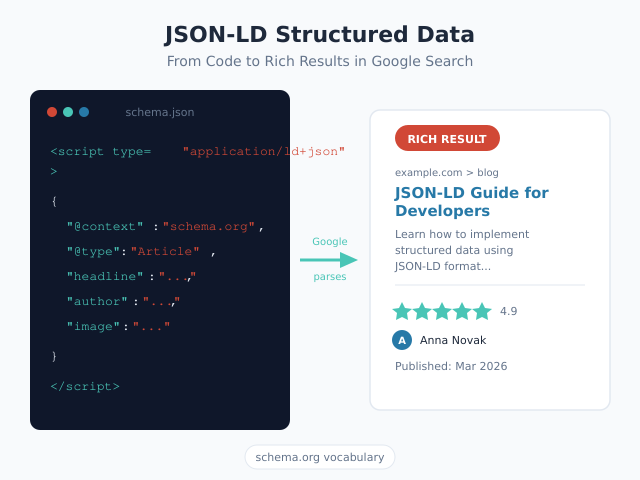
Search engines read HTML, but they don’t truly understand it. JSON-LD structured data bridges that gap by embedding machine-readable context directly into your pages. For developers building sites that need rich results — star ratings, FAQ accordions, breadcrumb trails, recipe cards — JSON-LD is the format Google explicitly recommends. This guide provides working code examples for six essential schema types, shows how to generate JSON-LD dynamically in WordPress and React, and walks through the testing workflow that catches errors before they reach production.
If you’re new to structured data concepts, start with our beginner’s guide to schema markup. This article goes deeper — into implementation patterns, framework integrations, and the validation pipeline every developer should follow.
What Is JSON-LD Structured Data?
JSON-LD (JavaScript Object Notation for Linked Data) is a method of encoding structured data using standard JSON syntax. It lives inside a <script type="application/ld+json"> tag on your page and describes your content in terms that search engines parse programmatically.
Here is the simplest possible example:
<script type="application/ld+json">
{
  "@context": "https://schema.org",
  "@type": "WebPage",
  "name": "About Us",
  "description": "Learn about our company."
}
</script>
The @context property points to Schema.org, the vocabulary maintained by Google, Bing, Yahoo, and Yandex. The @type property declares what the content represents. Every other property provides details about that type.
Google processes JSON-LD to determine whether a page qualifies for rich results — enhanced search listings with images, ratings, prices, or expandable sections. Without structured data, your pages compete on title and description alone. With it, they can occupy significantly more visual real estate in search results.
JSON-LD vs Microdata vs RDFa: Why JSON-LD Wins
Three formats exist for implementing structured data. All three use the Schema.org vocabulary. However, they differ fundamentally in how they attach to your HTML.
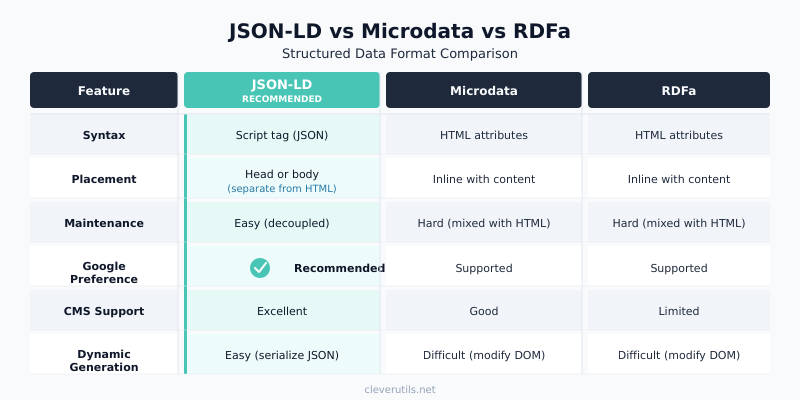
| Feature | JSON-LD | Microdata | RDFa |
|---|---|---|---|
| Placement | Separate <script> block |
Inline HTML attributes | Inline HTML attributes |
| Couples with markup? | No — fully decoupled | Yes — tightly coupled | Yes — tightly coupled |
| Dynamic generation | Easy (serialize JSON) | Difficult (modify DOM) | Difficult (modify DOM) |
| Maintenance | Update one block | Edit scattered attributes | Edit scattered attributes |
| Google recommendation | Preferred format | Supported | Supported |
| Works with SPAs? | Yes (inject via JS) | Poorly | Poorly |
| Readability | Standard JSON | Cluttered HTML | Cluttered HTML |
Microdata requires attributes like itemscope, itemtype, and itemprop woven directly into your HTML elements. Consequently, changing your page layout means updating structured data too. RDFa uses a similar inline approach with different attribute names.
JSON-LD avoids this coupling entirely. Because it sits in its own script block, you can refactor templates, redesign layouts, and restructure components without touching your structured data. Additionally, generating JSON programmatically is trivial — just build an object and serialize it.
For these reasons, Google explicitly recommends JSON-LD as the preferred structured data format.
Essential JSON-LD Structured Data Types for Rich Results
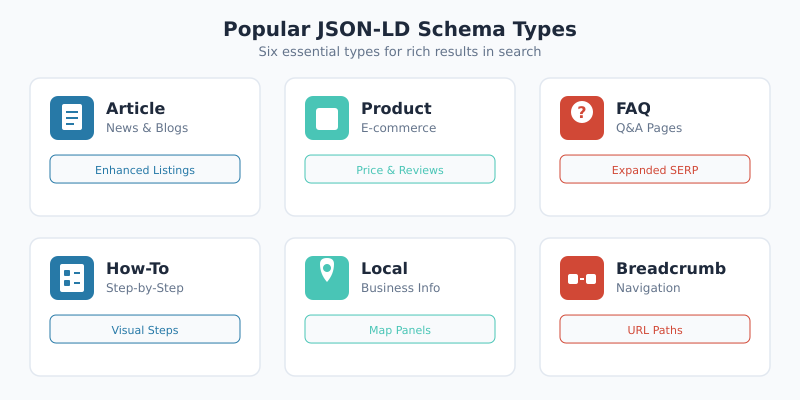
Schema.org defines over 800 types, but only a subset triggers rich results in Google Search. Below are six essential types every developer should know, each with a working JSON-LD snippet and a description of the rich result it produces.
Article and BlogPosting
Use Article or BlogPosting for editorial content. This schema can surface your content in Top Stories carousels and display author information, publication dates, and thumbnail images in search results.
<script type="application/ld+json">
{
  "@context": "https://schema.org",
  "@type": "BlogPosting",
  "headline": "JSON-LD Structured Data: A Developer's Guide",
  "image": "https://example.com/images/json-ld-hero.png",
  "author": {
    "@type": "Person",
    "name": "Anna Novak",
    "url": "https://example.com/about/"
  },
  "publisher": {
    "@type": "Organization",
    "name": "CleverUtils",
    "logo": {
      "@type": "ImageObject",
      "url": "https://example.com/logo.png"
    }
  },
  "datePublished": "2026-02-26",
  "dateModified": "2026-02-26",
  "description": "Working JSON-LD examples for 6+ schema types."
}
</script>
Rich result: Article cards with headline, thumbnail, author name, and publication date. Eligible for Top Stories on mobile.
Product (with Reviews)
Product schema drives some of the most visually impactful rich results. Star ratings, price, and availability appear directly in search listings — critical for e-commerce click-through rates.
<script type="application/ld+json">
{
  "@context": "https://schema.org",
  "@type": "Product",
  "name": "Wireless Ergonomic Keyboard",
  "image": "https://example.com/images/keyboard.png",
  "brand": { "@type": "Brand", "name": "TechCo" },
  "offers": {
    "@type": "Offer",
    "price": "89.99",
    "priceCurrency": "USD",
    "availability": "https://schema.org/InStock",
    "url": "https://example.com/products/keyboard"
  },
  "aggregateRating": {
    "@type": "AggregateRating",
    "ratingValue": "4.6",
    "reviewCount": "312"
  }
}
</script>
Rich result: Star ratings, price ($89.99), availability badge (“In Stock”), and review count displayed below the page title.
FAQPage
FAQ schema produces expandable question-and-answer accordions directly in search results. Each answer can include links, making this schema type especially valuable for occupying SERP space.
<script type="application/ld+json">
{
  "@context": "https://schema.org",
  "@type": "FAQPage",
  "mainEntity": [
    {
      "@type": "Question",
      "name": "What is JSON-LD?",
      "acceptedAnswer": {
        "@type": "Answer",
        "text": "JSON-LD is a format for encoding structured data using JSON syntax, recommended by Google for implementing schema markup."
      }
    },
    {
      "@type": "Question",
      "name": "Where do I place JSON-LD on my page?",
      "acceptedAnswer": {
        "@type": "Answer",
        "text": "Place the script tag in the <head> or anywhere in the <body>. Google reads it regardless of position."
      }
    }
  ]
}
</script>
Rich result: Expandable FAQ accordion below your search listing with clickable questions that reveal answers inline.
HowTo
HowTo schema structures step-by-step instructions. Google can render these as a numbered list of steps, sometimes with images, directly in search results.
<script type="application/ld+json">
{
  "@context": "https://schema.org",
  "@type": "HowTo",
  "name": "How to Add JSON-LD to a WordPress Site",
  "totalTime": "PT10M",
  "step": [
    {
      "@type": "HowToStep",
      "name": "Create the JSON-LD object",
      "text": "Build the structured data object matching your content type using Schema.org vocabulary."
    },
    {
      "@type": "HowToStep",
      "name": "Add to your theme",
      "text": "Hook into wp_head and echo the script tag containing your serialized JSON."
    },
    {
      "@type": "HowToStep",
      "name": "Validate with Rich Results Test",
      "text": "Run your page URL through Google's Rich Results Test to confirm eligibility."
    }
  ]
}
</script>
Rich result: Numbered steps displayed as a collapsible list with total time estimate. Appears prominently for “how to” queries.
LocalBusiness
LocalBusiness schema powers the local pack — the map-based results that appear for location-specific queries. It communicates address, hours, phone number, and geographic coordinates.
<script type="application/ld+json">
{
  "@context": "https://schema.org",
  "@type": "LocalBusiness",
  "name": "Portland Coffee Lab",
  "image": "https://example.com/storefront.jpg",
  "address": {
    "@type": "PostalAddress",
    "streetAddress": "456 Oak Avenue",
    "addressLocality": "Portland",
    "addressRegion": "OR",
    "postalCode": "97201"
  },
  "telephone": "+1-503-555-0199",
  "openingHoursSpecification": {
    "@type": "OpeningHoursSpecification",
    "dayOfWeek": ["Monday","Tuesday","Wednesday","Thursday","Friday"],
    "opens": "07:00",
    "closes": "18:00"
  },
  "geo": {
    "@type": "GeoCoordinates",
    "latitude": 45.5152,
    "longitude": -122.6784
  }
}
</script>
Rich result: Business information in local pack results with address, hours, phone number, and map pin.
BreadcrumbList
BreadcrumbList schema replaces the raw URL in search results with a clean navigational trail. This improves both aesthetics and click-through rates by showing users where the page sits within your site hierarchy.
<script type="application/ld+json">
{
  "@context": "https://schema.org",
  "@type": "BreadcrumbList",
  "itemListElement": [
    {
      "@type": "ListItem",
      "position": 1,
      "name": "Home",
      "item": "https://example.com/"
    },
    {
      "@type": "ListItem",
      "position": 2,
      "name": "Developer",
      "item": "https://example.com/developer/"
    },
    {
      "@type": "ListItem",
      "position": 3,
      "name": "JSON-LD Guide"
    }
  ]
}
</script>
Rich result: Breadcrumb trail (Home > Developer > JSON-LD Guide) replaces the green URL string beneath the page title in search results.
How to Add JSON-LD Structured Data to Your Website
Implementation varies by platform. Below are three common approaches covering static sites, WordPress, and modern JavaScript frameworks.
Static HTML
For static sites, place the JSON-LD script tag directly in your HTML. The <head> section is conventional, but Google reads JSON-LD from anywhere on the page.
<!DOCTYPE html>
<html lang="en">
<head>
  <meta charset="UTF-8">
  <title>My Article</title>
  <script type="application/ld+json">
  {
    "@context": "https://schema.org",
    "@type": "Article",
    "headline": "My Article Title",
    "datePublished": "2026-02-26"
  }
  </script>
</head>
<body>...</body>
</html>
This method works well for landing pages, small sites, and any project where you control the HTML directly. For larger sites, however, manual management becomes error-prone. That is why dynamic generation matters.
WordPress (Without Plugins)
In WordPress, hook into wp_head to inject JSON-LD dynamically. This approach generates structured data from post metadata — no plugin required.
// Add to functions.php
function custom_article_schema() {
  if ( ! is_singular( 'post' ) ) return;

  $post = get_post();
  $schema = [
    '@context'      => 'https://schema.org',
    '@type'         => 'Article',
    'headline'      => get_the_title(),
    'image'         => get_the_post_thumbnail_url( $post, 'full' ),
    'datePublished' => get_the_date( 'c' ),
    'dateModified'  => get_the_modified_date( 'c' ),
    'author'        => [
      '@type' => 'Person',
      'name'  => get_the_author(),
    ],
  ];

  echo '<script type="application/ld+json">'
     . wp_json_encode( $schema, JSON_UNESCAPED_SLASHES )
     . '</script>';
}
add_action( 'wp_head', 'custom_article_schema' );
The wp_json_encode() function safely serializes the array, and JSON_UNESCAPED_SLASHES keeps URLs readable. Because the data pulls from WordPress directly, it stays in sync with your content automatically.
JavaScript Frameworks (React and Next.js)
In React-based apps, inject JSON-LD using a dedicated component. For Next.js, the <Head> component (Pages Router) or the Metadata API (App Router) handles it cleanly.
React component pattern:
function JsonLd({ data }) {
  return (
    <script
      type="application/ld+json"
      dangerouslySetInnerHTML={{
        __html: JSON.stringify(data)
      }}
    />
  );
}

// Usage
const articleSchema = {
  "@context": "https://schema.org",
  "@type": "Article",
  "headline": "My React Article",
  "datePublished": "2026-02-26"
};

<JsonLd data={articleSchema} />
Next.js App Router (13.2+):
// app/blog/[slug]/page.tsx
export default function BlogPost({ params }) {
  const jsonLd = {
    "@context": "https://schema.org",
    "@type": "BlogPosting",
    "headline": post.title,
    "datePublished": post.publishedAt,
    "author": { "@type": "Person", "name": post.author }
  };

  return (
    <>
      <script
        type="application/ld+json"
        dangerouslySetInnerHTML={{
          __html: JSON.stringify(jsonLd)
        }}
      />
      <article>{/* content */}</article>
    </>
  );
}
For server-rendered pages, the JSON-LD appears in the initial HTML response. This ensures search engine crawlers see it without executing JavaScript. In contrast, client-only rendering may delay or prevent structured data indexing.
Testing and Validating JSON-LD Structured Data
Writing JSON-LD is only half the job. Without validation, syntax errors, missing properties, or incorrect types can silently prevent rich results. Follow this three-step workflow before deploying any structured data.
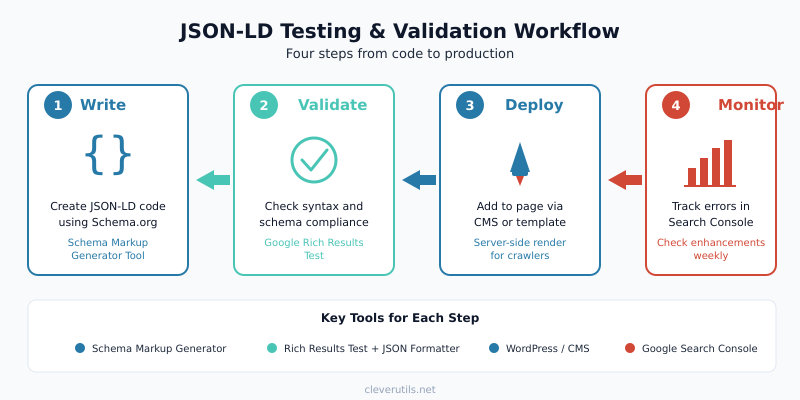
- Format and lint the JSON. Run your JSON-LD through a JSON formatter to catch syntax errors — missing commas, unmatched brackets, or invalid escaping. Even a single misplaced comma will cause Google to ignore the entire block.
- Test with Google’s Rich Results Test. Paste your URL or code snippet into the Rich Results Test. It reports which rich result types your page qualifies for and flags any errors or warnings.
- Monitor in Google Search Console. After deployment, check the Enhancements section regularly. It surfaces validation issues across your entire site and tracks rich result impressions over time.
Additionally, the Schema.org Validator checks general schema compliance beyond Google-specific requirements. Use it when you need to verify conformance with the full Schema.org specification.
For rapid prototyping, our Schema Markup Generator produces validated JSON-LD for common types. It handles required properties automatically, so you start with a correct baseline every time.
Common JSON-LD Structured Data Errors and Fixes
Certain mistakes appear repeatedly in structured data implementations. The table below covers the most frequent errors reported in Google Search Console, their causes, and the correct fixes.
| Error | Cause | Fix |
|---|---|---|
Missing field "image" |
Article or Product schema lacks the image property |
Add an image URL — Google requires it for most rich results |
Invalid value in field "price" |
Price includes currency symbol (“$89.99”) or commas | Use numeric value only: "price": "89.99"; specify currency in priceCurrency |
Missing field "author" |
Article schema omits author object | Add "author": { "@type": "Person", "name": "Name" } |
Invalid URL in field "url" |
Relative URL instead of absolute | Always use full URLs: https://example.com/page |
Parse error or no data detected |
Malformed JSON (trailing comma, single quotes, unescaped characters) | Validate JSON syntax — use double quotes, no trailing commas, escape special characters |
Missing field "name" |
LocalBusiness or Product missing the name property |
Add the name property — it’s required for virtually every schema type |
Value for availability not valid |
Using plain text like “In Stock” instead of Schema.org URL | Use "availability": "https://schema.org/InStock" |
| Structured data not detected at all | Script tag has wrong type attribute or JSON is loaded via client-side JS only | Ensure type="application/ld+json" and render server-side for crawlers |
Most of these errors come down to two principles: always use absolute URLs and always validate your JSON syntax before deployment. A JSON formatter tool catches the syntax issues instantly.
Emerging Schema Types for 2026
Schema.org continues to evolve. Two relatively new types deserve attention from developers building content-heavy or community-driven sites.
LearningResource describes educational content — courses, tutorials, and training materials. As search engines surface more educational content in dedicated carousels, implementing this type positions your tutorials for enhanced visibility. Properties include educationalLevel, teaches, and competencyRequired.
DiscussionForumPosting applies to forum threads, community Q&A, and comment-driven content. Google has expanded support for this type to power discussion and forum rich results. If your site hosts community discussions, this schema helps individual threads surface in search.
Furthermore, as AI-powered search experiences like Google’s AI Overviews become more prevalent, well-structured data gives AI models clear signals about your content’s authority and relevance. Structured data essentially makes your content easier for any machine — crawler or AI — to interpret correctly.
JSON-LD Structured Data Best Practices
Follow these guidelines to maximize the value of your structured data implementation and avoid common pitfalls.
- Match schema to visible content. Every claim in your JSON-LD must be verifiable on the page. Google penalizes structured data that describes content users cannot see.
- Use the most specific type available. Choose
BlogPostingoverArticlefor blog content,RestaurantoverLocalBusinessfor restaurants. Specific types unlock more rich result features. - Always include recommended properties. Required properties get you in the door. Recommended properties — like
dateModified,description, andimage— increase your chances of earning rich results. - Use absolute URLs exclusively. Relative paths like
/images/photo.jpgcause validation errors. Always provide the full URL including protocol and domain. - Don’t mark up hidden content. Schema for content behind tabs, accordions, or login walls may trigger manual actions. Only mark up content that’s immediately accessible to users.
- Keep JSON-LD in the initial HTML. Server-side rendering ensures crawlers see your structured data on the first pass. Client-side injection may work, but it introduces indexing uncertainty.
- Implement one schema per page initially. Start with the most relevant type, validate it, then layer additional types as needed. Multiple schema blocks on one page work fine, but complexity increases the chance of errors.
- Monitor Search Console weekly. Structured data errors can emerge when content changes. Regular monitoring catches regressions before they affect rich result eligibility.
- Don’t use schema as a ranking hack. Adding irrelevant schema types or fabricating review data violates Google’s spam policies and risks manual penalties.
- Test on staging before production. Use the Rich Results Test with your staging URL or code snippets to validate changes before they go live.
JSON-LD Structured Data Quick Reference
Use this table to quickly identify which schema type produces the rich result you need. For complete property lists, consult the Google Search Gallery.
| Schema Type | Rich Result | Key Required Properties |
|---|---|---|
| Article / BlogPosting | Article card, Top Stories | headline, image, datePublished, author |
| Product | Price, ratings, availability | name, image, offers |
| FAQPage | Expandable Q&A accordion | mainEntity (Question + Answer) |
| HowTo | Numbered step list | name, step |
| LocalBusiness | Local pack, map results | name, address |
| BreadcrumbList | Breadcrumb trail in SERP | itemListElement (ListItem) |
| LearningResource | Educational content card | name, description, educationalLevel |
| DiscussionForumPosting | Forum/discussion result | headline, author, datePublished |
To generate any of these types without writing code manually, try our Schema Markup Generator. It produces copy-ready JSON-LD with all required and recommended properties included.
Bottom Line
JSON-LD structured data is the most efficient way to communicate your content’s meaning to search engines. It decouples structured data from your HTML, works across every platform and framework, and is the format Google prefers.
Start with the schema type most relevant to your content — Article for blogs, Product for e-commerce, LocalBusiness for physical locations. Validate thoroughly using the Rich Results Test. Then monitor Search Console for issues as your content evolves.
Structured data isn’t a one-time implementation. As Schema.org adds new types and Google expands rich result support, the developers who maintain and extend their structured data will continue to earn visibility that others miss. Additionally, the rise of AI-powered search makes clean, machine-readable data more valuable than ever. Build the habit now and it will compound over time.
For hands-on implementation, the Meta Tags Generator handles Open Graph and Twitter Card metadata, while our Schema Markup Generator covers JSON-LD. Together with proper Open Graph tags, your pages deliver structured context to every platform that reads them.