Hreflang Tags: The Complete Guide to Multilingual SEO
 Anna Novak
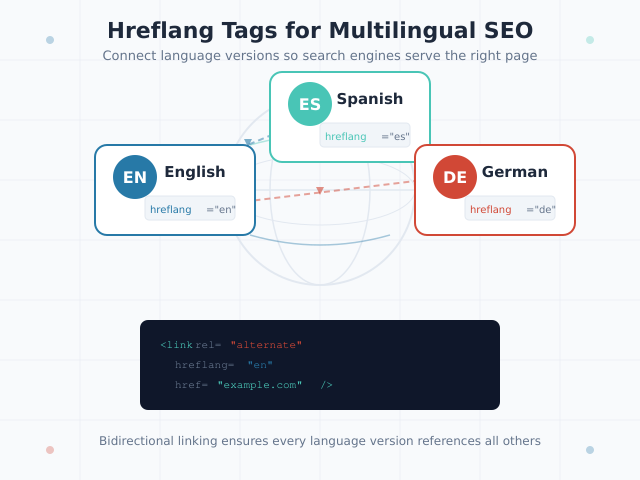
Hreflang tags tell search engines which language and regional version of a page to show specific users. Without them, a Spanish-speaking visitor in Mexico might land on your English page, while your carefully translated Spanish version sits unindexed. Worse, search engines may treat your translated pages as duplicate content and penalize your rankings across all versions.
This guide covers everything you need to implement hreflang tags correctly. You’ll learn the syntax, the three implementation methods, the rules search engines enforce, and the mistakes that cause Google to silently ignore your markup. By the end, you’ll have a clear framework for deciding when you need hreflang and how to deploy it without errors.
What Are Hreflang Tags?
Hreflang tags are HTML attributes that specify the language and optional geographic targeting of a webpage. Introduced by Google in 2011, they solve a fundamental problem: when you publish the same content in multiple languages or for different regions, search engines need explicit signals to serve the right version to the right audience.
Consider a company with three versions of a product page: one in English for the US, one in English for the UK, and one in German for Germany. Without hreflang tags, Google sees three similar pages and must guess which to rank. It might choose the US version for all English queries, effectively burying your UK-specific page with localized pricing and spelling.
Hreflang annotations create a relationship map between these page variants. They declare: “This page exists in these languages and regions, and here’s where to find each version.” Search engines then use this map to match users with the most appropriate version based on their language settings and location.
How Search Engines Use Hreflang Tags
Google and Yandex are the only major search engines that support hreflang tags. Bing uses a different approach — the content-language meta tag and language-specific sitemaps. However, since Google dominates global search traffic, hreflang implementation remains essential for international SEO.
When Googlebot encounters hreflang annotations, it does not treat them as directives. Instead, they function as signals — strong hints that influence which URL appears in search results for users matching specific language and region criteria. Google may still override your hreflang if other signals contradict it, such as the actual page content being in a different language than declared.
When Do You Need Hreflang Tags?
Not every multilingual site needs hreflang tags. They solve specific problems, and implementing them unnecessarily adds complexity without benefit. Use this decision framework to determine whether your site requires them.
You Need Hreflang Tags If:
- Same content in multiple languages: You publish translated or localized versions of the same page (e.g., English and French versions of a product page)
- Regional variations of the same language: You maintain separate pages for US English and UK English, or Latin American Spanish and European Spanish
- Partially translated sites: Some pages exist in multiple languages while others exist only in your default language
- Different URLs per language: Your language versions live on separate URLs — subdomains (de.example.com), subdirectories (/de/), or separate domains (example.de)
You Do Not Need Hreflang Tags If:
- Single-language site: You publish content in only one language for one region
- Dynamic translation only: You use JavaScript-based translation that doesn’t create separate URLs
- Content differs substantially: Your regional sites have entirely different content, not translations of the same pages
- Same URL serves all languages: You use content negotiation (serving different languages from the same URL based on browser settings) — this approach is discouraged by Google
Key principle: Hreflang tags connect equivalent pages across languages. If page A in English and page B in French cover the same topic for the same intent, they should be linked with hreflang. If they cover different topics, hreflang is the wrong solution.
Hreflang Tag Syntax Explained
Every hreflang annotation follows the same structure, regardless of implementation method. Understanding the syntax prevents the most common errors.
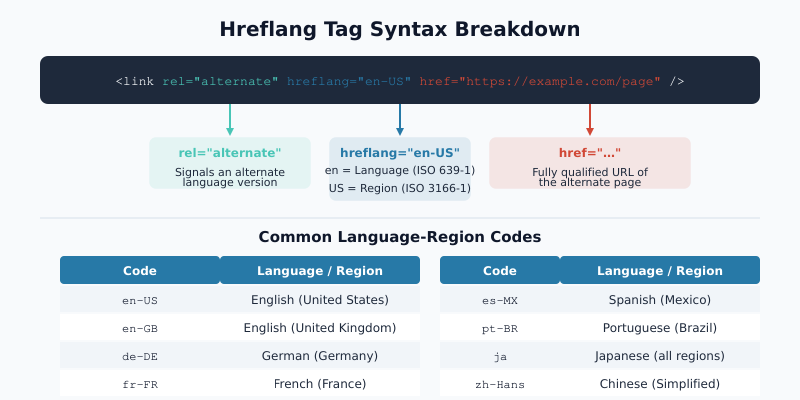
The basic format looks like this:
<link rel="alternate" hreflang="en-US" href="https://example.com/en-us/page/" />Three components define each hreflang tag:
rel="alternate"— declares this link points to an alternative version of the current pagehreflang="en-US"— specifies the language (required) and region (optional) of the target pagehref="..."— the fully qualified URL of the alternative version
Language Codes (ISO 639-1)
The language component uses ISO 639-1 two-letter codes. These are mandatory — you cannot use hreflang without specifying a language.
| Code | Language | Code | Language |
|---|---|---|---|
| en | English | fr | French |
| de | German | es | Spanish |
| pt | Portuguese | ja | Japanese |
| zh | Chinese | ko | Korean |
| it | Italian | nl | Dutch |
| ru | Russian | ar | Arabic |
Always use lowercase for language codes. Using “EN” instead of “en” violates the specification, though most search engines handle this gracefully.
Region Codes (ISO 3166-1 Alpha-2)
The optional region component uses ISO 3166-1 alpha-2 country codes. Add a region code only when you need to differentiate between the same language for different countries.
| Hreflang Value | Meaning | Use Case |
|---|---|---|
en |
English (any region) | Single English version for all countries |
en-US |
English for the United States | US-specific pricing, spelling, regulations |
en-GB |
English for the United Kingdom | UK-specific content and terminology |
pt-BR |
Portuguese for Brazil | Brazilian Portuguese vs European Portuguese |
zh-TW |
Chinese for Taiwan | Traditional Chinese characters |
A critical distinction: you cannot specify a region without a language. The value US alone is invalid. It must always be en-US (language first, then region). Additionally, region codes use uppercase letters while language codes use lowercase.
The x-default Attribute
The x-default value serves as a fallback. It tells search engines which page to show when no other hreflang value matches the user’s language or region.
<link rel="alternate" hreflang="x-default" href="https://example.com/" />Typically, x-default points to one of two things:
- Your language selector page: A page where users choose their preferred language
- Your primary language version: Usually the English or most widely understood version
While technically optional, omitting x-default means Google decides the fallback on its own. In practice, always include it. Every hreflang implementation should have exactly one x-default per set of alternate pages.
Three Implementation Methods for Hreflang Tags
You can implement hreflang annotations in three ways. Each has distinct advantages depending on your site architecture and scale.
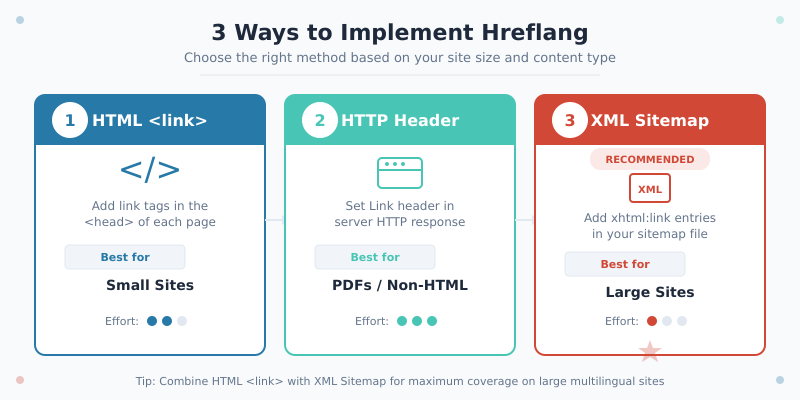
| Method | Best For | Max Pages | Complexity |
|---|---|---|---|
| HTML link elements | Small sites (under 50 pages) | Low | Low |
| HTTP headers | Non-HTML files (PDFs, docs) | Low | Medium |
| XML sitemap | Large sites (hundreds+ pages) | Unlimited | Medium-High |
Important: choose one method per page. Mixing methods for the same page (e.g., HTML tags plus sitemap entries) is technically allowed but increases the risk of contradictions and maintenance headaches.
HTML Link Elements
Place hreflang link elements in the <head> section of each page. This is the simplest method and works well for small to medium sites.
<!-- On https://example.com/en/about/ -->
<link rel="alternate" hreflang="en" href="https://example.com/en/about/" />
<link rel="alternate" hreflang="fr" href="https://example.com/fr/about/" />
<link rel="alternate" hreflang="de" href="https://example.com/de/about/" />
<link rel="alternate" hreflang="x-default" href="https://example.com/en/about/" />
Every page in the set must list all alternates, including itself. This self-referencing requirement catches many people off guard but is mandatory for correct implementation.
HTTP Headers
HTTP headers deliver hreflang annotations without modifying file content. This method is essential for non-HTML resources like PDFs, where you cannot embed link elements.
Link: <https://example.com/en/guide.pdf>; rel="alternate"; hreflang="en",
      <https://example.com/fr/guide.pdf>; rel="alternate"; hreflang="fr",
      <https://example.com/de/guide.pdf>; rel="alternate"; hreflang="de"
Configure these headers in your web server (Nginx or Apache) or CDN. In Nginx, you would add the headers within the appropriate location block. This method is rarely used for standard HTML pages because HTML link elements are simpler to manage.
XML Sitemap
For large sites with hundreds or thousands of localized pages, the XML sitemap method scales best. Instead of adding tags to every page, you declare all language relationships in your sitemap file.
<?xml version="1.0" encoding="UTF-8"?>
<urlset xmlns="http://www.sitemaps.org/schemas/sitemap/0.9"
        xmlns:xhtml="http://www.w3.org/1999/xhtml">
  <url>
    <loc>https://example.com/en/page/</loc>
    <xhtml:link rel="alternate" hreflang="en" href="https://example.com/en/page/" />
    <xhtml:link rel="alternate" hreflang="fr" href="https://example.com/fr/page/" />
    <xhtml:link rel="alternate" hreflang="de" href="https://example.com/de/page/" />
    <xhtml:link rel="alternate" hreflang="x-default" href="https://example.com/en/page/" />
  </url>
  <url>
    <loc>https://example.com/fr/page/</loc>
    <xhtml:link rel="alternate" hreflang="en" href="https://example.com/en/page/" />
    <xhtml:link rel="alternate" hreflang="fr" href="https://example.com/fr/page/" />
    <xhtml:link rel="alternate" hreflang="de" href="https://example.com/de/page/" />
    <xhtml:link rel="alternate" hreflang="x-default" href="https://example.com/en/page/" />
  </url>
</urlset>
The sitemap method centralizes all hreflang declarations in one file, making updates easier for large sites. However, sitemaps must stay synchronized with actual page availability — pointing to a non-existent page breaks the entire set for that URL.
Implementation Rules That Search Engines Enforce
Hreflang tags follow strict rules. Violating any of these causes search engines to partially or completely ignore your annotations.
Rule 1: Self-Referencing Is Mandatory
Every page must include a hreflang tag pointing to itself. If your English page lists French and German alternates, it must also list itself as the English alternate. Omitting the self-referencing tag is one of the most frequent implementation errors.
Rule 2: Bidirectional Confirmation Required
Hreflang annotations must be reciprocal. If page A declares page B as its French alternate, then page B must declare page A as its English alternate. One-directional annotations are invalid — Google calls this “missing return links” and ignores unconfirmed relationships.
This bidirectional requirement means every change affects multiple pages. Adding a new language version requires updating every existing language version to reference the new one. For a site with 10 language versions, adding an 11th means updating all 10 existing versions.
Rule 3: Canonical URLs Must Align
The URL specified in your hreflang tag must match the page’s canonical URL. If a page has rel="canonical" pointing to URL-A, but the hreflang tag on another page points to URL-B, the annotation breaks. Consequently, always ensure your hreflang URLs and canonical tags reference the same URLs.
Rule 4: Use Absolute URLs
All hreflang href values must be fully qualified URLs including the protocol. Use https://example.com/en/page/ rather than /en/page/. Relative URLs cause parsing failures.
Rule 5: One Language-Region Code Per URL
Each URL in a hreflang set can appear only once per language-region combination. You cannot assign both en-US and en-GB to the same URL. Each distinct language-region pair requires its own distinct URL.
Common Hreflang Mistakes and How to Fix Them
After auditing hundreds of international sites, certain hreflang errors appear repeatedly. This table documents the most damaging mistakes alongside their solutions.
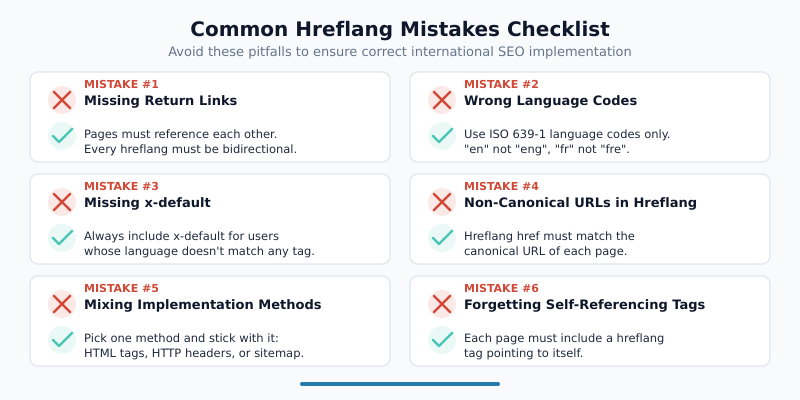
| Mistake | Impact | Fix |
|---|---|---|
| Missing self-referencing tag | Entire hreflang set may be ignored | Add a hreflang tag on each page pointing to itself |
| One-directional annotations | Unconfirmed relationships are discarded | Ensure every page references all alternates and every alternate references back |
| Wrong language codes (e.g., “uk” for English) | Invalid code makes the tag unrecognizable | Use ISO 639-1 codes: “en” for English, “uk” for Ukrainian |
| Using country code without language (e.g., “US”) | Invalid syntax — completely ignored | Always lead with language: “en-US” not “US” |
| Hreflang URL differs from canonical URL | Conflicting signals cause Google to ignore hreflang | Align hreflang href values with canonical URLs exactly |
| Pointing to non-existent (404) pages | Broken alternate links invalidate the set | Audit all hreflang URLs regularly and remove dead links |
| Mixing implementation methods per page | Conflicting annotations may confuse crawlers | Stick to one method (HTML, HTTP header, or sitemap) per page |
| Relative URLs in href attributes | Parsing failures — tags silently fail | Use absolute URLs: https://example.com/en/page/ |
| Missing x-default | No fallback for unmatched users | Add x-default pointing to your primary or language-selector page |
Many of these errors are invisible — no browser warning appears, and search engines fail silently. You need proactive validation to catch them, which is why testing tools matter so much.
When Google Ignores Your Hreflang Tags
Even with correct syntax, Google sometimes disregards hreflang annotations. Understanding why helps you troubleshoot ranking issues in international search.
Page Content Contradicts the Language Declaration
If your hreflang tag declares a page as French (hreflang="fr") but the actual content is in English, Google trusts what it can detect over what you declare. Always ensure the on-page content genuinely matches the declared language. Additionally, avoid large blocks of untranslated content such as English navigation menus on otherwise translated pages.
Pages Are Not Indexed
Hreflang only works for indexed pages. If an alternate page is blocked by robots.txt, has a noindex tag, or returns a non-200 HTTP status, Google cannot process the hreflang relationship. Verify that all pages in your hreflang set are crawlable and indexable.
Canonical Tags Point Elsewhere
When a page’s canonical URL differs from the URL used in hreflang annotations, Google follows the canonical and ignores the hreflang. This commonly happens when www and non-www versions, or HTTP and HTTPS versions, don’t match. Consequently, standardize your URL format across all signals.
Hreflang Set Is Incomplete
If page A references page B, but page B doesn’t reference page A back, Google considers the relationship unconfirmed. Incomplete bidirectional links are the number-one reason hreflang fails in practice. Furthermore, adding or removing language versions without updating all existing pages creates orphaned references that break the chain.
Sitemap Is Not Submitted or Crawled
If you use the XML sitemap method, Google must actually discover and process your sitemap. Submit it through Google Search Console and monitor for errors. An unprocessed sitemap means your hreflang annotations effectively do not exist.
Testing and Validating Hreflang Tags
Validation catches errors before they impact your international rankings. Use a combination of automated tools and manual checks.
Automated Validation Tools
Several approaches help you validate hreflang implementation:
- Google Search Console: The International Targeting report flags hreflang errors including missing return links, unknown language codes, and unreachable URLs
- Site crawlers: Tools like Screaming Frog and Sitebulb can audit hreflang across your entire site, identifying broken links and missing reciprocal annotations
- Our Hreflang Tag Generator: Generate correct hreflang markup instantly by entering your page URLs and language codes — eliminates syntax errors entirely
Manual Validation Checklist
After implementation, verify these items for each page set:
- Every page includes a self-referencing hreflang tag
- Every alternate relationship is bidirectional
- All hreflang URLs return 200 status codes
- All hreflang URLs match their respective canonical URLs
- Language and region codes follow ISO standards
- Exactly one x-default exists per page set
- The declared language matches the actual page content
Combining Hreflang With Other Technical SEO Elements
Hreflang does not exist in isolation. For a robust international SEO setup, ensure your hreflang annotations work alongside other technical elements. Use structured data markup to provide additional context about your content in each language. Optimize your meta tags for each localized version to maximize click-through rates in regional search results.
Additionally, just as Open Graph tags control social previews, hreflang tags control search result targeting. Similarly, schema markup helps search engines understand content meaning — hreflang helps them understand content audience. Together, these technical SEO elements form a comprehensive signal system for search engines.
Real-World Implementation Example
Here is a complete example for an e-commerce site targeting four markets. The company sells products in English (US and UK), French, and German.
<!-- On every page in the set, include ALL four alternates plus x-default -->

<!-- US English version: https://example.com/en-us/product/ -->
<link rel="alternate" hreflang="en-US" href="https://example.com/en-us/product/" />
<link rel="alternate" hreflang="en-GB" href="https://example.co.uk/product/" />
<link rel="alternate" hreflang="fr" href="https://example.fr/produit/" />
<link rel="alternate" hreflang="de" href="https://example.de/produkt/" />
<link rel="alternate" hreflang="x-default" href="https://example.com/en-us/product/" />
Notice several important details in this example. First, the US version uses en-US while the UK version uses en-GB, because the content differs between regions (pricing, spelling, regulatory information). Second, the French and German versions use language-only codes (fr and de) because only one version exists per language. Third, x-default points to the US English version as the global fallback. Finally, all five link elements appear on every single page in the set.
Bottom Line
Hreflang tags are essential for any website serving content in multiple languages or targeting multiple regions with the same language. They prevent duplicate content issues, ensure users find the right language version, and maximize your international search visibility.
The implementation requires attention to detail — bidirectional links, self-referencing tags, canonical alignment, and valid language codes all must be correct. A single broken link in the chain can cause Google to discard your entire hreflang set for that page.
Start with the Hreflang Tag Generator to create error-free markup. Then validate your implementation through Google Search Console and regular site crawls. For most sites, the HTML link element method works well. If you manage hundreds of localized pages, move to the XML sitemap approach for centralized management.
The effort pays off. Correct hreflang implementation means the right content reaches the right audience — and that directly translates to better engagement, lower bounce rates, and stronger international rankings.