Content Readability: How to Write for Humans and Search Engines
 Anna Novak
Content readability determines whether your audience actually absorbs what you write — or bounces within seconds. Research from the Nielsen Norman Group shows that 79% of web users scan rather than read. If your content fails the scan test, your message never reaches its audience, regardless of how valuable the information is.
This guide breaks down readability into measurable components. You’ll learn how scoring systems work, what benchmarks to target by industry, and how to apply a practical editing framework that transforms dense text into content people actually finish. Whether you write blog posts, landing pages, or product copy, these principles directly improve engagement metrics and search performance.
What Is Content Readability?
Content readability measures how easily a reader can understand written text. It accounts for sentence structure, word complexity, paragraph length, and visual formatting. High readability doesn’t mean dumbing down your content — it means removing unnecessary barriers between your ideas and your reader’s comprehension.
In practice, two dominant scoring systems assess readability, each using different approaches.
Flesch Reading Ease
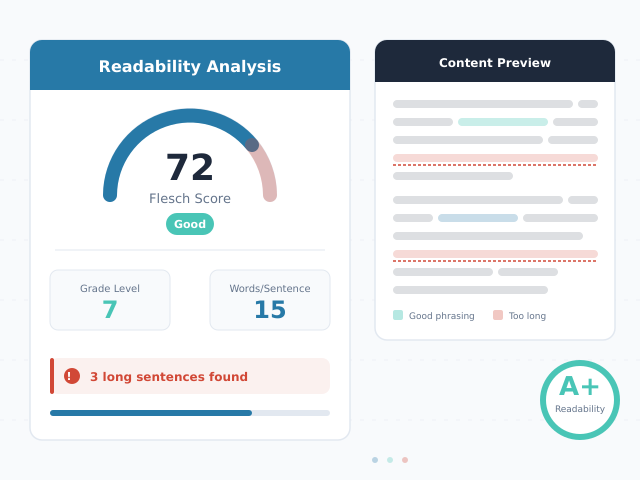
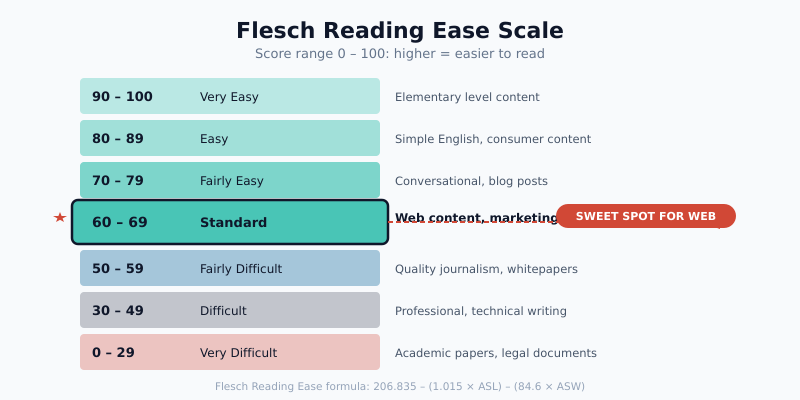
The Flesch Reading Ease score rates text on a 0-100 scale, where higher scores indicate easier reading. The formula considers average sentence length and average syllables per word:
206.835 - (1.015 × ASL) - (84.6 × ASW)
In this formula, ASL represents average sentence length (words per sentence) and ASW represents average syllables per word. Consequently, a score of 60-70 suits most web content, corresponding roughly to an 8th-9th grade reading level.
Hemingway Editor Approach
The Hemingway Editor takes a different approach. Instead of producing a single score, it highlights specific problems: adverbs, passive voice, complex sentences, and hard-to-read phrases. This makes it more actionable for writers. However, the Hemingway approach lacks the standardized benchmarking that Flesch scores provide.
Reading Grade Levels
Grade-level metrics translate readability scores into education levels required to understand the text. Most successful online content targets a 6th-8th grade reading level. Indeed, this doesn’t reflect your audience’s intelligence — it reflects how people prefer to consume information when scanning on screens.
| Flesch Score | Grade Level | Difficulty | Best For |
|---|---|---|---|
| 90-100 | 5th grade | Very easy | Children’s content, basic instructions |
| 80-89 | 6th grade | Easy | Consumer content, social media |
| 70-79 | 7th grade | Fairly easy | Blog posts, email newsletters |
| 60-69 | 8th-9th grade | Standard | Marketing content, B2B blogs |
| 50-59 | 10th-12th grade | Fairly difficult | Technical documentation, whitepapers |
| 30-49 | College | Difficult | Academic papers, legal documents |
| 0-29 | Graduate | Very difficult | Scientific research, legislation |
Why Content Readability Matters for SEO
Search engines increasingly prioritize user experience signals. Content readability directly influences these signals, creating a measurable link between how you write and how you rank.
How Readability Affects Dwell Time and Bounce Rate
When visitors encounter dense, hard-to-read content, they leave quickly. A Search Engine Journal analysis found that pages scoring above 60 on the Flesch scale averaged 70% longer dwell times than pages scoring below 40. Consequently, readable content keeps visitors engaged, which signals quality to search algorithms.
Bounce rates tell a similar story. Pages with short paragraphs and clear subheadings consistently show 15-25% lower bounce rates compared to wall-of-text equivalents. Furthermore, these engagement improvements compound over time as search engines observe sustained positive user behavior.
Featured Snippets and Voice Search
Featured snippets overwhelmingly favor content written at accessible reading levels. Additionally, voice search answers tend to pull from content at a 9th-grade reading level or below. As voice search grows, readability becomes even more critical for visibility.
Mobile-First Indexing
With mobile-first indexing now standard, content readability carries additional weight. Mobile screens amplify readability problems — long paragraphs become scrolling walls of text, and complex sentences require re-reading on small displays. Google evaluates your content as mobile users experience it, making mobile readability essential for rankings.
Readability Metrics Explained
Essentially, understanding the major readability formulas helps you choose the right metric for your content type. Each formula emphasizes different aspects of text complexity.
| Metric | Measures | Formula Basis | Target Score (Web Content) |
|---|---|---|---|
| Flesch Reading Ease | Overall readability (0-100) | Sentence length + syllable count | 60-70 |
| Flesch-Kincaid Grade | U.S. grade level | Sentence length + syllable count | Grade 7-8 |
| Gunning Fog Index | Years of education needed | Sentence length + complex words | 8-10 |
| SMOG Index | Years of education needed | Polysyllabic word count | 8-10 |
| Coleman-Liau Index | U.S. grade level | Character count + sentence count | Grade 7-9 |
Flesch Reading Ease
The Flesch Reading Ease remains the most widely used readability metric. Yoast SEO, WordPress’s leading SEO plugin, uses it as the default readability measure. As a result, scores above 60 earn a green light in Yoast’s analysis.
To improve your Flesch score, focus on two levers: shorten sentences and choose simpler words. Replacing a three-syllable word with a one-syllable alternative has roughly three times the impact of removing a single word from a sentence. Therefore, vocabulary simplification often yields faster score improvements than sentence restructuring.
Flesch-Kincaid Grade Level
The Flesch-Kincaid Grade Level converts the same inputs into a U.S. school grade. A score of 8.0 means an eighth-grader can understand the text. This metric is especially useful for setting team-wide standards because grade levels are intuitive — everyone understands “write at an 8th-grade level.”
Notably, the grade-level scale has no upper limit. Academic papers often score at grade 16 or higher. For web content, aim for grade 7-8 to maximize comprehension across your audience.
Gunning Fog Index
The Gunning Fog Index specifically penalizes “complex words” — those with three or more syllables. This makes it particularly useful for identifying jargon-heavy writing. A Fog Index above 12 suggests your content requires college-level reading skills.
In practice, the Gunning Fog Index catches problems that Flesch scores miss. For instance, short sentences packed with technical terminology can score well on Flesch but poorly on Gunning Fog. Using both metrics together provides a more complete readability picture.
Optimal Content Length by Type
Content readability and content length work together. Specifically, longer content needs stronger readability practices because reader fatigue increases with word count. Here are research-backed benchmarks for different content types.
| Content Type | Optimal Length | Target Flesch Score | Max Paragraph Length |
|---|---|---|---|
| Blog posts (informational) | 1,500-2,500 words | 60-70 | 100 words |
| Long-form guides | 2,500-4,000 words | 55-65 | 80 words |
| Landing pages | 500-1,000 words | 65-75 | 60 words |
| Product descriptions | 150-300 words | 60-70 | 50 words |
| Email newsletters | 200-500 words | 65-75 | 60 words |
| Social media posts | 40-100 words | 70-80 | 40 words |
| Whitepapers | 3,000-6,000 words | 45-60 | 120 words |
| Case studies | 1,000-2,000 words | 55-65 | 80 words |
Use our Word Counter tool to check your content length and estimated reading time before publishing. Matching length to format ensures readers get the depth they expect without unnecessary padding.
How Readers Actually Read Online
Understanding reading behavior transforms how you structure content. In fact, online readers behave fundamentally differently from print readers, and content readability strategies must account for these patterns.
The F-Pattern and Scanning Behavior
Eye-tracking research consistently confirms that web users read in an F-shaped pattern. They read the first line or two fully, then scan down the left side, occasionally reading partial lines. This means your first paragraph, subheadings, and opening words of each paragraph carry disproportionate weight.
Specifically, users spend approximately 80% of their attention on the left half of the screen. Bold text, bullet points, and subheadings receive significantly more fixations than body text. Therefore, front-loading key information in every section is critical.
Mobile Readability Behavior
Mobile devices now account for over 60% of web traffic. On mobile screens, reading behavior shifts in several important ways:
- Shorter attention spans: Mobile sessions average 72 seconds versus 150 seconds on desktop
- Single-column scanning: Users scroll vertically rather than scanning in F-patterns
- Thumb-zone awareness: Interactive elements in the lower third of the screen get more taps
- Context switching: Mobile readers frequently switch between apps, making content “re-entry” important
For mobile readability, paragraphs should be even shorter — two to three sentences maximum. Additionally, subheadings serve as “re-entry points” for readers returning after interruptions. Clear, descriptive subheadings help mobile readers locate where they left off.
The 5-Second Readability Test
Research shows that visitors form judgments about content quality within 5 seconds of landing on a page. In those seconds, they evaluate visual structure — not content. Importantly, pages with clear headings, short paragraphs, and visible formatting elements pass this test. Dense text blocks fail it, regardless of content quality.
The Editing Framework for Better Content Readability
Improving readability requires a systematic approach, not vague advice to “write better.” This five-step framework transforms any draft into more readable content. Apply each step sequentially during your editing process.
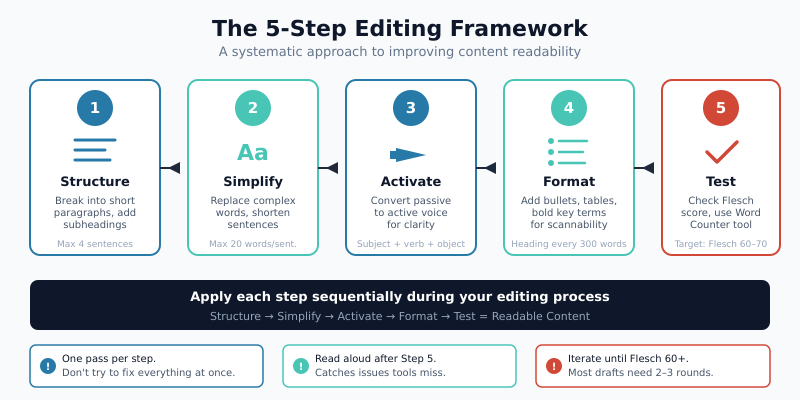
Step 1: Shorten Sentences
Long sentences force readers to hold multiple ideas in working memory simultaneously. Target a maximum of 20 words per sentence, with at least 75% of your sentences meeting this threshold.
Technique: Find every sentence over 20 words and split it. Look for conjunctions (and, but, because, which) as natural breaking points.
- Highlight all sentences over 20 words in your draft
- Split compound sentences at conjunctions
- Convert complex clauses into separate sentences
- Remove filler phrases (“it is important to note that,” “the fact that,” “in order to”)
- Verify the rewritten version preserves your original meaning
Step 2: Simplify Vocabulary
Every multi-syllable word you replace with a simpler alternative improves your readability score. This doesn’t mean avoiding all technical terms — it means eliminating unnecessary complexity.
| Instead of | Use | Syllable Savings |
|---|---|---|
| Utilize | Use | 3 → 1 |
| Implement | Start / Set up | 3 → 1-2 |
| Approximately | About / Roughly | 5 → 2 |
| Demonstrate | Show | 3 → 1 |
| Subsequently | Then / Next | 4 → 1 |
| Facilitate | Help / Enable | 4 → 1-2 |
| Methodology | Method / Approach | 5 → 2 |
| Comprehensive | Full / Complete | 4 → 1-2 |
Technical terms your audience expects — like “conversion rate” or “bounce rate” — should stay. Simplify the surrounding language instead. That way, your technical vocabulary stands out clearly rather than getting lost in a sea of complexity.
Step 3: Break Up Paragraphs
No paragraph should exceed 150 words for web content. In practice, aim for 40-80 words per paragraph. Short paragraphs create white space that makes content visually approachable.
Apply these rules when breaking paragraphs:
- One idea per paragraph — if you introduce a new concept, start a new paragraph
- Maximum 4 sentences per paragraph
- Single-sentence paragraphs are acceptable for emphasis
- After every complex explanation, add a short paragraph that summarizes or transitions
Step 4: Add Visual Anchors
Visual anchors are formatting elements that help scanning readers navigate your content. They include subheadings, bullet lists, tables, bold text, and blockquotes. Effective use of visual anchors can improve content comprehension by up to 47% according to usability research.
Follow these visual anchor guidelines:
- Add a subheading every 250-300 words
- Convert any list of three or more items into a bulleted or numbered list
- Bold key terms and important phrases (but limit to 2-3 bold elements per section)
- Use tables for any data comparison — readers process tabular data 30% faster than prose
- Include blockquotes for key takeaways or definitions
Step 5: Read Aloud
Reading your text aloud reveals problems that silent reading misses. Awkward phrasing, run-on sentences, and unnatural rhythms become immediately obvious when spoken.
During your read-aloud session, mark any sentence where you run out of breath — it’s too long. Flag any word you stumble on — it’s too complex. Note any section where you lose your place — it needs better transitions. This step catches 80% of remaining readability issues that automated tools miss.
Before and After: Content Readability Rewrites
Theory becomes useful when you see it applied. Here are three real-world rewrites demonstrating the editing framework in action.
Example 1: Marketing Blog Introduction
Before (Flesch score: 32):
“The implementation of a comprehensive multi-channel marketing attribution methodology is fundamentally essential for organizations seeking to optimize their marketing expenditure allocation and subsequently maximize the return on their substantial marketing investments across all customer touchpoints and engagement channels throughout the entire customer journey.”
After (Flesch score: 68):
“Marketing attribution shows which channels drive your sales. Without it, you’re guessing where to spend your budget. A clear attribution model helps you invest more in what works and cut what doesn’t — across every touchpoint in the customer journey.”
What changed: One 41-word sentence became three sentences averaging 14 words. “Implementation of a comprehensive multi-channel marketing attribution methodology” became “marketing attribution.” The meaning is identical; the readability is transformed.
Example 2: Product Description
Before (Flesch score: 38):
“Our sophisticated analytics platform provides organizations with unprecedented capabilities to leverage advanced machine learning algorithms for the purpose of identifying previously undetectable patterns in consumer behavioral data, thereby facilitating more informed strategic decision-making processes at the enterprise level.”
After (Flesch score: 71):
“Our analytics platform uses machine learning to spot patterns in customer behavior that manual analysis misses. The result: smarter decisions backed by data, not hunches. Teams at companies like Shopify and HubSpot use it to improve campaign performance by 20-35%.”
What changed: Removed filler words (“unprecedented capabilities,” “for the purpose of,” “thereby facilitating”). Added a specific data point (20-35% improvement). Replaced abstract benefits with concrete outcomes.
Example 3: Technical Documentation
Before (Flesch score: 29):
“The configuration of the meta description element within the HTML document head section necessitates careful consideration of multiple SEO-related factors, including but not limited to keyword placement optimization, character length constraints, and the incorporation of compelling calls-to-action that effectively incentivize user engagement with the search engine results page listing.”
After (Flesch score: 65):
“Writing a good meta description requires three things: the right keywords, proper length (under 156 characters), and a clear call-to-action. Place your primary keyword near the beginning. Then tell readers exactly what they’ll gain by clicking. Use our Meta Tags Generator to preview how your description appears in search results.”
What changed: “Configuration of the meta description element within the HTML document head section” became “writing a good meta description.” The abstract instruction became a concrete three-part checklist. A tool recommendation adds practical value.
Content Readability Benchmarks by Industry
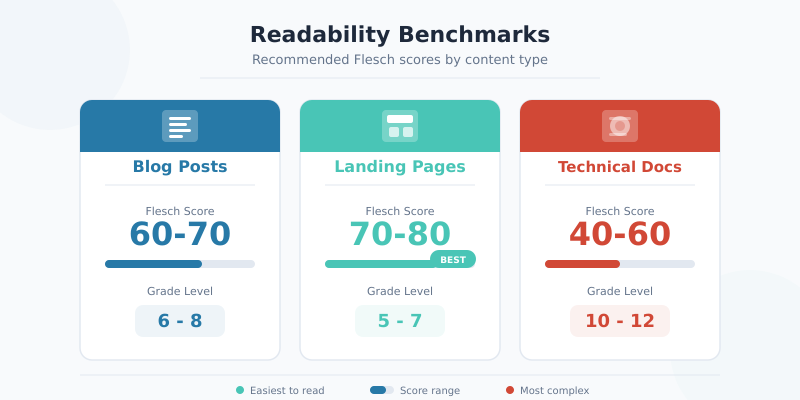
Readability targets vary significantly across industries. What works for a consumer lifestyle blog would feel overly simplistic in a cybersecurity whitepaper. These benchmarks reflect analysis of top-performing content across each sector.
| Industry | Target Flesch Score | Target Grade Level | Avg. Sentence Length | Max Paragraph Length |
|---|---|---|---|---|
| E-commerce / Retail | 65-75 | Grade 6-7 | 12-15 words | 60 words |
| SaaS / Technology | 55-65 | Grade 8-9 | 15-18 words | 80 words |
| Healthcare | 50-60 | Grade 8-10 | 15-18 words | 80 words |
| Finance / Insurance | 45-60 | Grade 9-11 | 16-20 words | 100 words |
| Legal | 40-55 | Grade 10-12 | 18-22 words | 120 words |
| Marketing / Advertising | 60-70 | Grade 7-8 | 13-16 words | 70 words |
| Education | 60-70 | Grade 7-8 | 14-17 words | 80 words |
| Travel / Hospitality | 65-75 | Grade 6-7 | 12-15 words | 60 words |
| B2B Services | 55-65 | Grade 8-9 | 15-18 words | 80 words |
These benchmarks serve as starting points, not rigid rules. Your specific audience may prefer slightly higher or lower complexity. Test different readability levels and measure engagement metrics to find your ideal range. Tools like our Word Counter help you monitor text statistics during the writing process.
When Lower Readability Scores Are Appropriate
Some audiences expect — and prefer — more complex writing. Technical documentation for developers, academic research summaries, and legal compliance content all warrant lower Flesch scores. The key distinction: complexity should come from necessary technical precision, not from poor writing habits.
For instance, a sentence like “Implement the OAuth 2.0 authorization code flow with PKCE” is appropriately complex for a developer audience. In contrast, “Implement the utilization of the authorization methodology” adds complexity without adding meaning. Target your audience’s knowledge level while eliminating unnecessary verbal overhead.
Content Readability Tools and Measurement
Consistent measurement makes readability improvement systematic rather than subjective. These tools provide the data you need to track and improve your writing over time.
- Yoast SEO: Built into WordPress, provides real-time readability scoring with specific improvement suggestions. Checks sentence length, paragraph length, passive voice, and transition word usage.
- Hemingway Editor: Color-codes problem areas in your text. Particularly useful for identifying adverb overuse and overly complex phrasing.
- Readable.com: Calculates multiple readability formulas simultaneously and provides a composite score. Best for comparing content across your site.
- Word Counter (CleverUtils): Our free Word Counter tool measures word count, character count, sentence count, and estimated reading time — essential metrics for content readability optimization.
Establish a readability baseline by scoring your last 10 published pieces. Then set improvement targets: for example, increasing your average Flesch score by 5 points over the next quarter. Tracking progress this way makes readability a measurable KPI rather than a vague aspiration.
Bottom Line
Content readability is not about simplifying your ideas — it’s about removing friction between those ideas and your reader. The data is clear: readable content earns longer dwell times, lower bounce rates, and better search rankings. These aren’t cosmetic improvements. They directly impact conversions and revenue.
Start with measurement. Score your existing content using the Flesch Reading Ease formula and the benchmarks above. Then apply the five-step editing framework — shorten sentences, simplify vocabulary, break paragraphs, add visual anchors, and read aloud. Even small improvements yield measurable results.
The writers who consistently produce engaging, high-performing content aren’t necessarily better thinkers. They’re better editors. They understand that every long sentence, every jargon-laden paragraph, and every wall of text is a barrier between their expertise and their audience’s understanding. Remove those barriers, and your content performs.