UTM Taxonomy: A Tiny Dictionary Your Team Will Actually Follow
 Anna Novak

If your campaign reports feel “off,” UTMs are rarely the problem. Messy naming is.
One person tags links with Facebook, another uses facebook, a third writes paid-social, and suddenly your analytics tool sees three different things. Your charts don’t lie — your naming does.
A UTM taxonomy is just a shared agreement: a small dictionary of allowed values + a few rules that stop chaos before it reaches your reports.
If you want the official baseline on what UTMs are and how they’re used, start here: URL builders: Collect campaign data with custom URLs.
What UTMs are (in plain English)
UTMs are small labels you add to a link. When someone clicks that link, your analytics tool reads those labels and can group traffic correctly.
Most teams only need three parameters:
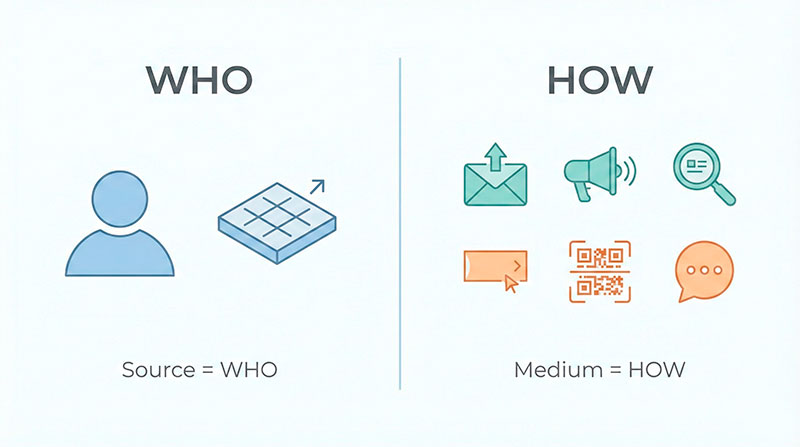
- utm_source = who sent the click (platform/partner)
- utm_medium = how it was sent (channel type)
- utm_campaign = your internal initiative name
Google’s documentation uses these same core campaign parameters when explaining how custom URLs collect campaign data.
The mindset: one concept = one value
Your goal is boring consistency.
- If you mean paid social, don’t alternate between
paid_social,social_paid,paid-social,paid, and “whatever the ads platform calls it.” - If your source is Facebook, don’t switch between
Facebook,facebook.com,fb, andmeta.
Once you standardize, two great things happen:
- reports stop splitting into duplicates
- it becomes easier to compare campaigns without guesswork
The Tiny Dictionary (copy this into your team doc)
This is the core of the article: the “allowed values” list.
Allowed utm_medium values (keep it boring)
| utm_medium | meaning | good for | don’t use |
|---|---|---|---|
| clicks from email | newsletters, lifecycle emails | Email, e-mail, newsletter | |
| paid_social | paid social ads | Meta/LinkedIn/TikTok ads | social_paid, paid, p_social |
| organic_social | non-paid posts | regular posts, bio links | social, organic, insta |
| cpc | paid search clicks | search ads | ppc, paid_search, sem |
| display | banner/display ads | programmatic, banners | banner, gdn (if unclear) |
| affiliate | affiliate network traffic | affiliate programs | aff, partners |
| referral | links from other sites | PR mentions, blog links | website, link |
| partner | direct partner collabs | co-marketing links | collaboration, partnership |
| qr | QR scans | flyers, posters, offline | offline |
| sms | text message links | SMS campaigns | text, message |
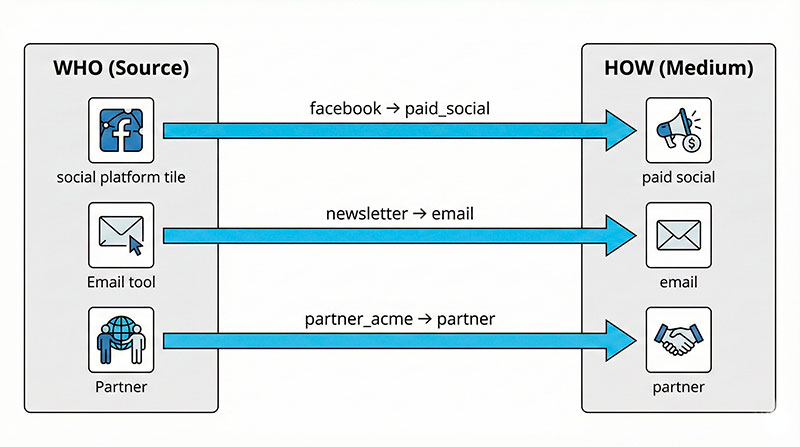
Rule: if your team needs a new medium, add it to the dictionary first. Otherwise, you’ll slowly rebuild chaos.
Allowed utm_source values (platform or partner name)
Source answers: “Where exactly did this click come from?”
| utm_source | when to use | example pair (source + medium) | don’t use |
|---|---|---|---|
| traffic from Facebook | facebook + paid_social | Facebook, fb.com, Meta | |
| traffic from Instagram | instagram + organic_social | Insta, IG | |
| traffic from LinkedIn | linkedin + paid_social | LinkedInAds | |
| traffic from Google ads/search | google + cpc | googleads, g_ads | |
| youtube | traffic from YouTube | youtube + referral | yt |
| newsletter | you don’t care which ESP sent it | newsletter + email | weekly_newsletter_may |
| mailchimp | you do care which ESP sent it | mailchimp + email | mc |
| partner_acme | a specific partner | partner_acme + partner | acme_partner (mixed order) |
| community | your own community hub | community + referral | forum, discord (pick one) |
Shortcut to remember:
utm_source= whoutm_medium= how
utm_campaign naming recipe (simple and scalable)
Campaign should be your internal label — not a channel name.
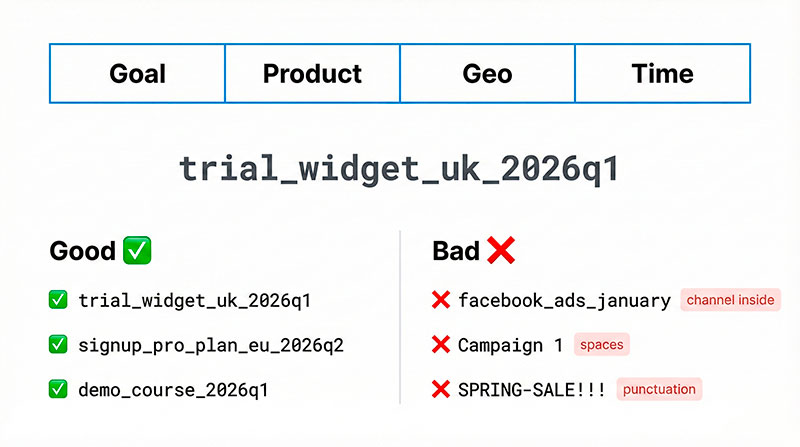
Use a predictable pattern like:
goal_product_geo_time
- goal: trial / signup / demo / purchase
- product: widget / pro_plan / course
- geo: us / uk / eu (optional)
- time: pick one format and stick to it (example:
2026q1)
Good:
trial_widget_uk_2026q1signup_pro_plan_eu_2026q2demo_course_2026q1
Bad:
facebook_ads_january(channel info belongs in source/medium)Campaign 1(meaningless + spaces)SPRING-SALE!!!(not sortable, not stable)
Rules that prevent 90% of UTM mistakes
Copy/paste these into your “UTM rules” doc:
- lowercase only (always)
- use
_as a separator (no spaces) - no synonyms (
cpcorppc, never both) - source = who, medium = how (don’t flip them)
- campaign is not a channel name
- choose one date format (
2026q1or2026-01) and never mix - avoid punctuation and emojis in values
- don’t put personal data in UTMs (names, emails, phone numbers)
- if a value doesn’t exist in the dictionary, add it first — then use it
- test-click one tagged link before launch
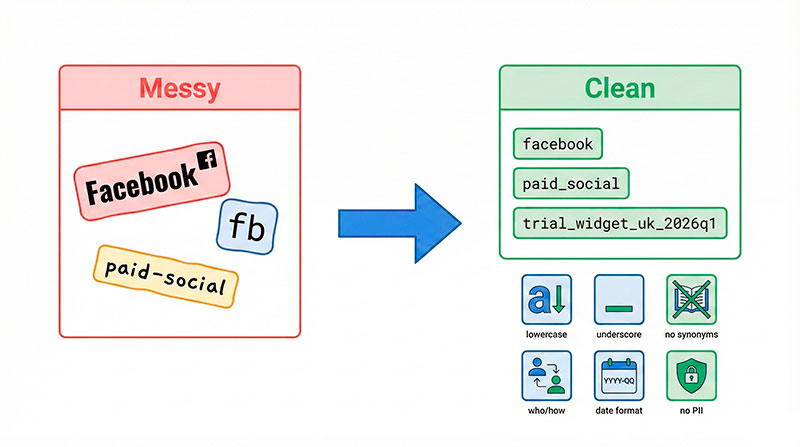
That “no personal data” rule is not optional. Google explicitly recommends keeping URLs and URL parameters free of personally identifiable information (PII). See: Best practices to avoid sending Personally Identifiable Information to Google. support.google.com
When utm_content and utm_term are actually useful
These are optional. Use them only when you have a clear reason.
Use utm_content when you need to compare variations
Think: “Same campaign, but different creative/placement.”
Examples:
- same email, two CTAs:
cta_topvscta_bottom - same campaign, two ad creatives:
video_15svsstatic_1 - same page, two placements:
header_bannervsfooter_banner
A good mental rule: if you can’t explain what you’ll do with this field, don’t fill it.
Use utm_term only when you store keyword-level detail
If you already have keywords tracked in an ad platform, copying them into UTMs often creates noise and inconsistency. Only use utm_term if your team has a stable convention for it.
If your team isn’t ready to maintain these fields, leave them blank.
10 examples your team can steal today
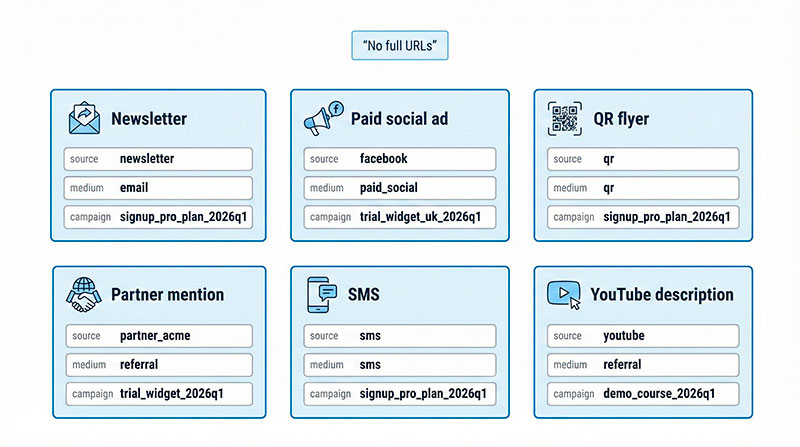
Notice: we list fields, not full URLs — that’s easier to audit.
| scenario | utm_source | utm_medium | utm_campaign | optional content/term |
|---|---|---|---|---|
| newsletter | newsletter | signup_pro_plan_2026q1 | content: cta_top | |
| paid social ad | paid_social | trial_widget_uk_2026q1 | content: video_15s | |
| organic post | organic_social | demo_course_2026q1 | content: link_in_bio | |
| influencer | partner_acme | partner | purchase_widget_2026q1 | content: influencer_a |
| QR flyer | qr | qr | signup_pro_plan_2026q1 | content: flyer_a |
| partner mention | partner_acme | referral | trial_widget_2026q1 | — |
| display banner | display | trial_widget_eu_2026q2 | content: banner_blue | |
| SMS | sms | sms | signup_pro_plan_2026q1 | content: shortlink_1 |
| YouTube description | youtube | referral | demo_course_2026q1 | content: desc_link |
| community post | community | referral | trial_widget_2026q1 | content: post_42 |
A simple UTM spreadsheet template (so nobody improvises)
If you don’t want people improvising UTMs in Slack messages, give them one place to generate and store tagged links.
Recommended columns:
- destination_url
- utm_source
- utm_medium
- utm_campaign
- utm_content
- utm_term
- notes
- owner
- date
- status (draft/approved/live)
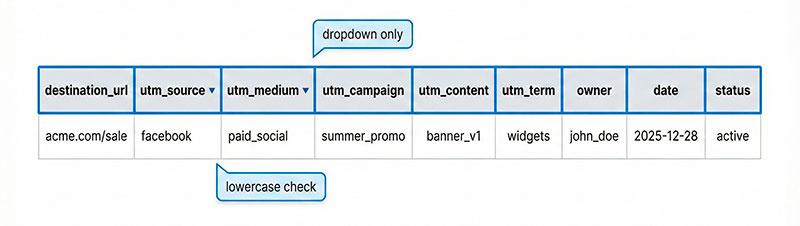
Three tiny “quality gates” that save your data:
- dropdowns for
utm_sourceandutm_medium(only allowed values) - an auto-lowercase check (or a “LOWER()” helper column)
- a quick review step before links go live
Where to see UTMs in GA4 (quick, no deep dive)
In GA4, UTM values show up in acquisition reporting, especially the Traffic acquisition report. Official doc: [GA4] Traffic acquisition report. support.google.com
Beginner approach:
- open Traffic acquisition
- use dimensions like source/medium and campaign to compare initiatives
- if data looks weird, suspect split naming (case, typos, synonyms) first
How to build tagged links fast (without inventing formats)
- Start with the final destination URL.
- Fill source/medium/campaign using your dictionary + recipe.
- Sanity check: lowercase, underscores, no “new” values.
- Test-click once.
If you want a safe starter tool, Google’s official builder is straightforward: Campaign URL Builder. ga-dev-tools.google
And for the “what does this do?” explanation, use: URL builders: Collect campaign data with custom URLs. support.google.com
Final checklist (print this)
☐ all values are lowercase
☐ _ used instead of spaces
☐ source is “who”, medium is “how”
☐ medium is one of the allowed dictionary values
☐ no synonyms (no mixing cpc/ppc, paid_social/social_paid, etc.)
☐ campaign matches the recipe (and is not a channel name)
☐ date format is consistent
☐ content/term only used when there’s a real comparison need
☐ no personal data in UTMs
☐ test-clicked and logged in the spreadsheet