UTM Parameters: The Complete Guide to Campaign URL Tracking
 Anna Novak
Every marketer faces the same challenge: understanding which campaigns actually drive results. You launch ads on Facebook, send email newsletters, run Google Ads campaigns, and partner with influencers—but when conversions happen, which channel deserves credit? UTM parameters solve this attribution puzzle by tagging your URLs with tracking codes that analytics platforms can read and report.
Without proper UTM tracking, your analytics data becomes a guessing game. Traffic sources blend together, campaign performance remains unclear, and budget decisions rely on intuition rather than evidence. In this comprehensive guide, you’ll learn exactly how UTM parameters work, how to implement them correctly, and how to avoid the common mistakes that corrupt marketing data.
What Are UTM Parameters?
UTM parameters (Urchin Tracking Module) are text snippets added to URLs that help analytics tools identify traffic sources. The name originates from Urchin Software Corporation, a web analytics company that Google acquired in 2005 to create Google Analytics. Although the technology is decades old, UTM parameters remain the industry standard for campaign tracking across virtually every analytics platform.
When someone clicks a link containing UTM parameters, those values travel to your website along with the visitor. Your analytics tool captures this data and associates it with the user’s session, allowing you to see precisely which marketing efforts drove each visit and conversion.
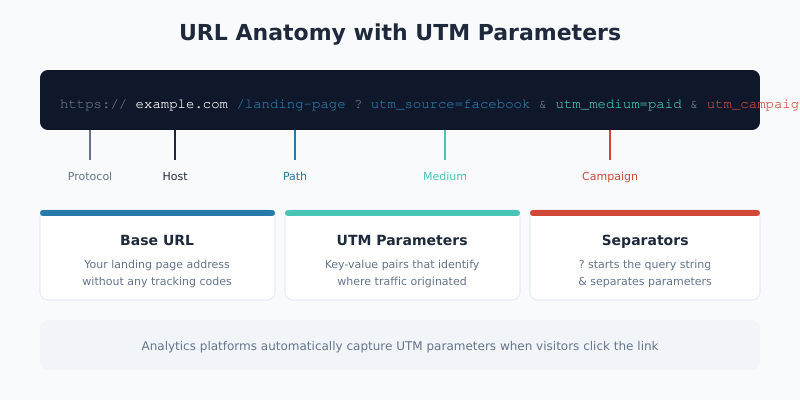
Here’s what a UTM-tagged URL looks like in practice:
https://example.com/landing-page?utm_source=facebook&utm_medium=paid_social&utm_campaign=spring_saleThe base URL (https://example.com/landing-page) is your destination page. Everything after the question mark consists of UTM parameters that provide context about the traffic source. Consequently, when this link receives clicks, your analytics will attribute those visits to Facebook paid social advertising for your spring sale campaign.
The Five UTM Parameters Explained
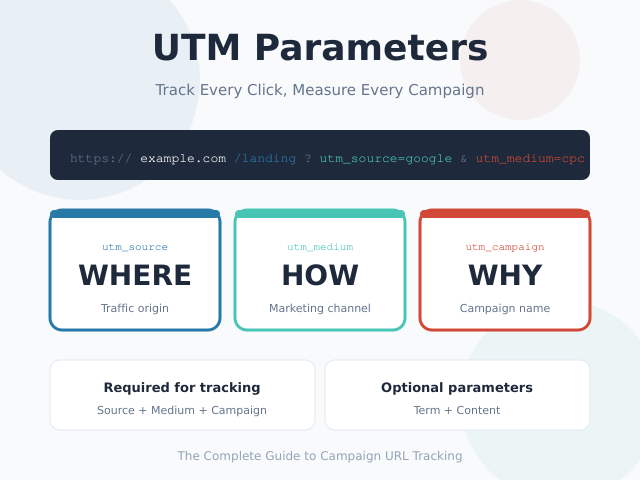
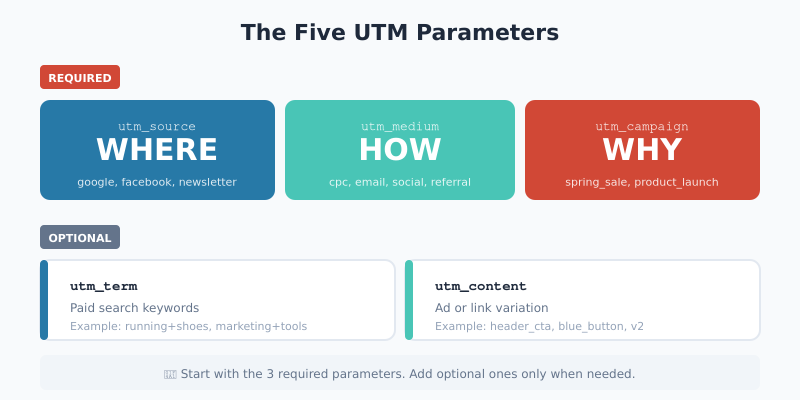
UTM tracking uses five distinct parameters, each serving a specific purpose in your attribution model. Three parameters are considered essential for meaningful tracking, while two remain optional for advanced segmentation.
Required Parameters
These three parameters form the foundation of UTM tracking. Without them, your campaign data lacks the context needed for actionable insights.
| Parameter | Purpose | Example Values |
|---|---|---|
utm_source |
Identifies WHERE traffic originates—the platform, website, or publication sending visitors | google, facebook, linkedin, newsletter, partner_site |
utm_medium |
Identifies HOW traffic arrives—the marketing channel or mechanism | cpc, organic, social, email, referral, display |
utm_campaign |
Identifies WHY traffic comes—the specific promotion, offer, or initiative | spring_sale, product_launch, brand_awareness, black_friday |
Think of these parameters as answering three fundamental questions about every visitor: Where did they come from? How did they get here? Why did they click?
Optional Parameters
These additional parameters provide granular detail for specific use cases, particularly paid advertising and A/B testing scenarios.
| Parameter | Purpose | When to Use |
|---|---|---|
utm_term |
Captures paid search keywords | Google Ads, Bing Ads, and other PPC campaigns where keyword-level tracking matters |
utm_content |
Differentiates similar links or ad variations | A/B testing ad creatives, multiple CTAs in emails, banner size variations |
For instance, if you’re testing two different button colors in an email campaign, utm_content=blue_button and utm_content=green_button would reveal which version drives more conversions.
How to Create UTM-Tagged URLs
Building UTM URLs manually is error-prone and time-consuming. A single typo or inconsistent capitalization can fragment your data, making analysis unreliable. Therefore, using a dedicated UTM builder tool ensures consistency and eliminates human error.
Step-by-Step URL Creation
- Start with your destination URL — the page where you want traffic to land (e.g.,
https://yoursite.com/landing-page) - Add utm_source — identify the traffic origin (e.g.,
facebook,google,newsletter) - Add utm_medium — specify the marketing channel (e.g.,
cpc,email,social) - Add utm_campaign — name your campaign descriptively (e.g.,
summer_sale_2025) - Add optional parameters — include
utm_termorutm_contentwhen additional granularity is needed - Test the URL — click your generated link to verify it loads correctly and parameters appear in your analytics
Our free UTM Builder automates this process with preset configurations for popular platforms like Google Ads, Facebook, Instagram, LinkedIn, and email marketing. Simply select a preset, enter your destination URL and campaign name, and copy the generated tracking link.
UTM Best Practices for Clean Data
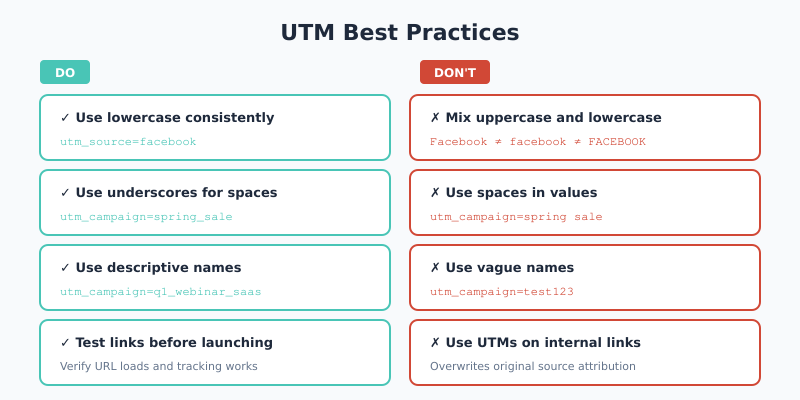
Consistent UTM implementation separates actionable analytics from chaotic data. Follow these proven practices to maintain data integrity across your organization.
Use Lowercase Consistently
UTM parameters are case-sensitive. utm_source=Facebook and utm_source=facebook appear as two separate sources in your reports. This fragmentation makes analysis difficult and can lead to incorrect conclusions about channel performance. Consequently, always use lowercase values to prevent data splitting.
Replace Spaces with Underscores
Spaces in URLs cause encoding issues and display inconsistently across platforms. Use underscores (_) or hyphens (-) instead. For example, write spring_sale rather than spring sale or spring%20sale.
Create a Naming Convention
Document your UTM taxonomy and share it with your entire marketing team. A standardized naming convention prevents different team members from using variations like fb, facebook, Facebook, and FB interchangeably. Standardization is essential for accurate cross-campaign analysis.
Keep Values Descriptive but Concise
Your UTM values should make sense when viewed in reports months later. utm_campaign=q1_2025_product_launch_webinar communicates far more than utm_campaign=campaign1. However, avoid excessively long values that become unwieldy—aim for clarity without verbosity.
Never Use UTMs on Internal Links
Adding UTM parameters to links within your own website overwrites the original traffic source. When a visitor who arrived from Google Ads clicks an internal link tagged with UTM parameters, their session restarts with the new source attribution. As a result, you lose visibility into which external channels actually drove the conversion. Reserve UTM tracking exclusively for external links pointing to your site.
Common UTM Mistakes to Avoid
Even experienced marketers make UTM errors that corrupt their analytics data. Understanding these pitfalls helps you maintain data quality from day one.
Inconsistent Capitalization
This remains the most frequent UTM mistake. One team member uses Email, another uses email, and a third uses EMAIL. Your analytics now shows three separate mediums instead of one unified channel. The solution is straightforward: always use lowercase, and enforce this rule through your UTM builder tool or documentation.
Vague Campaign Names
Campaign names like test, campaign1, or new provide zero context when reviewing data later. Instead, include relevant details: the quarter, product, promotion type, or target audience. For instance, q2_saas_trial_retargeting immediately communicates what this campaign entailed.
Including Sensitive Information
UTM parameters are visible in browser address bars, server logs, and shared links. Never include personally identifiable information (PII) like email addresses, user IDs, or account numbers in your UTM values. This practice violates privacy regulations and exposes sensitive data unnecessarily.
Forgetting to Test Links
A broken UTM link loses both the visitor and the attribution data. Before launching any campaign, click your tagged URLs to verify they load the correct page and that parameters appear in your real-time analytics. This simple verification prevents embarrassing errors and data loss.
Over-Complicating Parameters
Not every link needs all five UTM parameters. For most campaigns, the three required parameters (source, medium, campaign) provide sufficient granularity. Adding unnecessary parameters creates complexity without analytical benefit. Use utm_term and utm_content only when you genuinely need that level of detail.
UTM Parameters by Marketing Channel
Different marketing channels require different UTM configurations. Here are recommended setups for the most common scenarios.
Paid Social Advertising
Social media platforms like Facebook, Instagram, LinkedIn, and TikTok use similar UTM structures:
utm_source=facebook
utm_medium=paid_social
utm_campaign=summer_sale_2025
utm_content=carousel_ad_v2
The utm_content parameter proves particularly valuable here for comparing ad creative performance across variations.
Email Marketing
Email campaigns benefit from detailed campaign naming that identifies the specific send:
utm_source=newsletter
utm_medium=email
utm_campaign=weekly_digest_jan_15
utm_content=header_cta
Including dates or sequence numbers in campaign names helps analyze trends over time and compare performance across sends.
Paid Search (PPC)
Google Ads and similar platforms support auto-tagging, but manual UTM parameters provide cross-platform consistency:
utm_source=google
utm_medium=cpc
utm_campaign=brand_keywords
utm_term=marketing+analytics+software
The utm_term parameter captures the specific keyword that triggered the ad, enabling keyword-level ROI analysis.
Influencer and Affiliate Marketing
Give each partner unique campaign values to measure individual contribution:
utm_source=influencer
utm_medium=referral
utm_campaign=john_smith_youtube
This approach reveals which partnerships deliver actual conversions versus mere traffic.
Offline to Online Campaigns
QR codes on print materials, event signage, or product packaging can drive trackable online traffic:
utm_source=qr_code
utm_medium=print
utm_campaign=conference_booth_2025
Short URLs combined with UTM parameters make offline-to-online attribution possible and measurable.
Viewing UTM Data in Analytics Platforms
Once you’ve implemented UTM tracking, you need to know where to find this data in your analytics tool. Most platforms automatically parse UTM parameters and display them in traffic source reports.
Common Analytics Platforms
UTM parameters work with virtually every analytics solution, including:
- Plausible Analytics — Privacy-friendly option with UTM data in Sources and Campaigns sections
- Matomo — Open-source alternative with campaigns under Acquisition reports
- Mixpanel — Product analytics with UTM data in traffic source properties
- Amplitude — Behavioral analytics showing UTMs in user property analysis
- Adobe Analytics — Enterprise solution with Marketing Channels reports
The specific navigation varies by platform, but the underlying data structure remains consistent because UTM parameters follow a universal standard rather than proprietary format.
What to Analyze
With UTM data available, focus your analysis on these key questions:
- Which sources drive the most conversions? — Compare conversion rates across
utm_sourcevalues - Which mediums have the best ROI? — Analyze cost per acquisition by
utm_medium - Which campaigns outperform others? — Review metrics across
utm_campaignvalues - Which ad variations resonate? — Compare engagement by
utm_contentwhen testing creatives
This analysis enables data-driven budget allocation, helping you invest more in high-performing channels and reduce spending on underperformers.
UTM Parameters and SEO
A common concern is whether UTM parameters affect search engine rankings. The short answer: no, UTM parameters don’t directly impact SEO. Search engines like Google understand that URL parameters are for tracking purposes and typically ignore them when indexing pages.
However, two technical considerations warrant attention:
- Canonical tags — Ensure your pages have proper canonical tags pointing to the clean URL (without UTM parameters) to prevent duplicate content issues
- Sitemap URLs — Never include UTM parameters in your XML sitemap URLs; only submit clean canonical URLs
Most modern CMS platforms and analytics tools handle these concerns automatically, but verifying your technical setup prevents potential indexing problems.
Bottom Line
UTM parameters transform marketing from guesswork into science. By consistently tagging your campaign URLs with source, medium, and campaign information, you gain clear visibility into which efforts drive real business results. The implementation requires minimal technical effort—just disciplined naming conventions and a reliable UTM builder tool.
Start with the three required parameters (utm_source, utm_medium, utm_campaign) on your next campaign. Document your naming conventions. Test your links before launch. Within weeks, you’ll have the attribution data needed to optimize budget allocation and prove marketing ROI with confidence.
The marketers who master UTM tracking don’t just measure performance—they improve it systematically based on evidence rather than intuition. That competitive advantage starts with a single properly tagged URL.