Robots.txt: The Complete Guide to Crawl Control in 2026
 Anna Novak
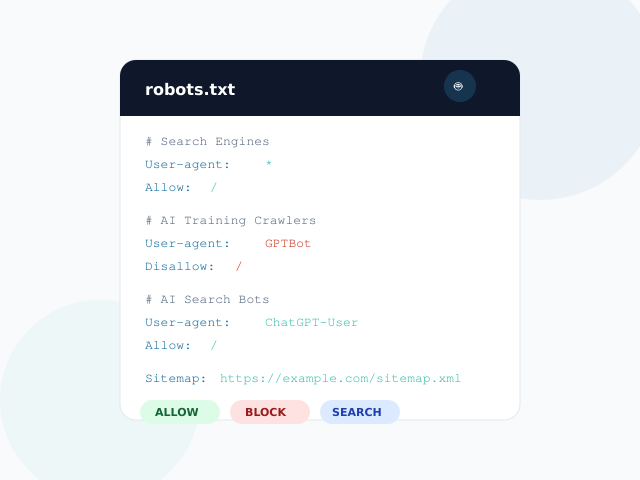
Robots.txt is the first file search engines and AI crawlers read when they visit your website. It determines what they can access and what stays off-limits. In 2026, this simple text file carries more weight than ever — because the crawlers knocking on your door now include GPTBot, ClaudeBot, and PerplexityBot alongside traditional search engines.
This guide covers everything you need to know about robots.txt: syntax, directives, AI crawler management, ready-to-use templates, and common mistakes. You can also use our free Robots.txt Generator to build and validate your file instantly.
What Is Robots.txt?
A robots.txt file is a plain text file placed at the root of your website (e.g., https://example.com/robots.txt) that tells web crawlers which pages or sections they can or cannot access. It follows the Robots Exclusion Protocol, an internet standard defined in RFC 9309.
Every major search engine respects robots.txt. When Googlebot, Bingbot, or any compliant crawler arrives at your site, the first thing it does is check /robots.txt for instructions. If the file blocks a path, compliant crawlers will not fetch those pages.
Crawling vs. Indexing: A Critical Distinction
Robots.txt controls crawling — whether a bot can fetch a page. It does not control indexing — whether a page appears in search results. A blocked URL can still show up in Google if other sites link to it. For indexing control, use the noindex meta tag or X-Robots-Tag HTTP header.
Important: Never use robots.txt for security. The file is publicly readable at
/robots.txt. Use authentication and server-side access controls for truly private content.
Robots.txt Syntax: Every Directive Explained
Robots.txt uses a straightforward syntax. Each rule consists of a directive name, a colon, and a value. Here is every directive you need to know.
User-Agent
The User-agent directive specifies which crawler the following rules apply to. Use * for all crawlers, or target specific bots by name.
User-agent: *
Disallow: /admin/

User-agent: GPTBot
Disallow: /
Disallow
The Disallow directive blocks access to a specified path. The path is case-sensitive and matches from the beginning of the URL path.
Disallow: /private/       # Blocks /private/ and everything under it
Disallow: /search          # Blocks /search, /searching, /search-results
Disallow: /                # Blocks the entire site
Allow
The Allow directive overrides a broader Disallow rule for a specific sub-path. Supported by Google, Bing, and Yandex.
User-agent: *
Disallow: /wp-admin/
Allow: /wp-admin/admin-ajax.php    # Override: allow AJAX endpoint
Sitemap
The Sitemap directive points crawlers to your XML sitemap. Unlike other directives, it is not tied to a specific User-agent block and must use an absolute URL.
Sitemap: https://example.com/sitemap.xml
Sitemap: https://example.com/sitemap-news.xml
Crawl-Delay
The Crawl-delay directive tells crawlers to wait a specified number of seconds between requests. Google ignores this directive entirely — use Google Search Console’s crawl rate settings instead. However, Bing and Yandex respect it.
Wildcards and Pattern Matching
Google and Bing support two pattern-matching characters that extend the basic syntax:
| Pattern | Meaning | Example | What It Blocks |
|---|---|---|---|
* |
Matches any sequence of characters | Disallow: /*.pdf$ |
All PDF files |
$ |
Matches the end of URL | Disallow: /page$ |
/page but not /page/about |
These patterns are powerful but require care. For instance, Disallow: /*? blocks all URLs with query parameters — including legitimate paginated content.
AI Crawlers in 2026: Training vs. Search
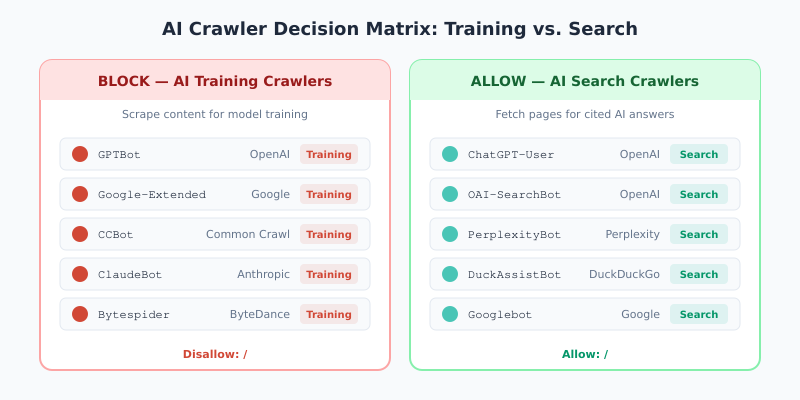
The biggest change in robots.txt management is the explosion of AI crawlers. Understanding the difference between AI training crawlers and AI search crawlers is now essential for every website owner.
AI Training Crawlers
Training crawlers scrape your content to build datasets for large language models. When you block these bots, your content cannot be used for model training. However, blocking training crawlers has no effect on your visibility in traditional search results.
According to Paul Calvano’s HTTP Archive analysis, nearly 21% of top 1,000 websites now reference GPTBot in their robots.txt files. Adoption has grown from zero to over 560,000 sites in under two years.
AI Search and Retrieval Crawlers
Search crawlers fetch pages on-demand to provide cited answers in AI search products like ChatGPT browsing, Perplexity, and Google AI Overviews. Allowing these bots means your content can appear as a cited source in AI-powered search results, driving traffic to your site.
The Complete AI Crawler Reference
| Crawler | Company | Purpose | Recommendation |
|---|---|---|---|
GPTBot |
OpenAI | Model training | Block |
Google-Extended |
Gemini training | Block | |
ClaudeBot |
Anthropic | Model training | Block |
CCBot |
Common Crawl | Open AI datasets | Block |
Bytespider |
ByteDance | TikTok AI training | Block |
Meta-ExternalAgent |
Meta | LLM data collection | Block |
ChatGPT-User |
OpenAI | On-demand search | Allow |
OAI-SearchBot |
OpenAI | ChatGPT search index | Allow |
PerplexityBot |
Perplexity | AI search answers | Allow |
DuckAssistBot |
DuckDuckGo | AI answer features | Allow |
Best practice: Block training crawlers to protect your intellectual property. Allow search crawlers to maintain visibility in AI-powered search results. This selective approach gives you the best of both worlds.
Five Ready-to-Use Robots.txt Templates
Choose the template that matches your situation. You can also customize these using our Robots.txt Generator with visual controls for each crawler category.
Template 1: Standard Website
User-agent: *
Allow: /

Sitemap: https://example.com/sitemap.xml
Allows all crawlers full access. Suitable for most websites that want maximum search engine visibility and have no sensitive content areas.
Template 2: WordPress Site
User-agent: *
Disallow: /wp-admin/
Allow: /wp-admin/admin-ajax.php
Disallow: /wp-login.php
Disallow: /?s=
Disallow: /feed/
Disallow: /trackback/

Sitemap: https://example.com/sitemap.xml
Blocks WordPress admin, login, internal search, feeds, and trackbacks while keeping all public content accessible. The admin-ajax.php Allow rule ensures proper page rendering.
Template 3: Block AI Training, Allow AI Search (Recommended)
User-agent: *
Allow: /

# Block AI Training Crawlers
User-agent: GPTBot
Disallow: /

User-agent: Google-Extended
Disallow: /

User-agent: ClaudeBot
Disallow: /

User-agent: CCBot
Disallow: /

User-agent: Bytespider
Disallow: /

# Allow AI Search Crawlers
User-agent: ChatGPT-User
Allow: /

User-agent: OAI-SearchBot
Allow: /

User-agent: PerplexityBot
Allow: /

Sitemap: https://example.com/sitemap.xml
The recommended approach for most websites in 2026. Your content remains fully accessible to search engines and AI search tools while staying out of AI training datasets.
Template 4: E-Commerce Site
User-agent: *
Disallow: /cart/
Disallow: /checkout/
Disallow: /my-account/
Disallow: /wishlist/
Disallow: /*?add-to-cart=*
Disallow: /*?orderby=*

Sitemap: https://example.com/sitemap.xml
Blocks shopping cart, checkout, account pages, and URL parameters that create duplicate product listings. Keeps all product and category pages fully crawlable.
Template 5: Maximum Restriction
User-agent: *
Disallow: /
Blocks all crawlers from the entire site. Use only for staging environments, private intranets, or pre-launch sites. Never deploy this in production accidentally.
Robots.txt vs. Meta Robots vs. X-Robots-Tag
These three mechanisms serve different purposes. Understanding when to use each prevents configuration conflicts.
| Mechanism | Scope | Controls | Best For |
|---|---|---|---|
robots.txt |
Entire site or sections | Crawling only | Blocking directories, managing crawl budget |
<meta name="robots"> |
Individual pages | Indexing and following | Preventing specific pages from appearing in search |
X-Robots-Tag |
Individual URLs | Indexing and following | Non-HTML files (PDFs, images) |
A common mistake is using robots.txt to block a page you want de-indexed. If the page is blocked by robots.txt, search engines cannot read the noindex meta tag on that page — so the URL may remain indexed indefinitely. To de-index a page, keep it crawlable and add a noindex tag.
How to Create Your Robots.txt File
Creating a robots.txt file is straightforward. The file must be named exactly robots.txt (lowercase), use UTF-8 encoding, and be placed at your domain root.
- Use a generator: Our Robots.txt Generator lets you configure crawler access, add path rules, and download the finished file with one click.
- Upload to your domain root: Place the file so it is accessible at
https://yourdomain.com/robots.txt. - Test your file: Use Google Search Console to validate that critical pages remain crawlable.
- Monitor regularly: Review your robots.txt quarterly. New AI crawlers emerge frequently, and site structure changes may require rule updates.
File Requirements
- Maximum file size: 500 KiB (Google limit)
- Each subdomain needs its own robots.txt
- Protocol-specific:
https://andhttp://require separate files - Google caches robots.txt for up to 24 hours, so changes are not instant
Common Robots.txt Mistakes
Even experienced developers make these errors. Each one can silently damage your search visibility.
Leaving Disallow: / from Staging
The most damaging mistake. When a staging site goes live with Disallow: / still in robots.txt, the entire site becomes invisible to search engines. Always verify robots.txt during launch checklists.
Blocking CSS and JavaScript
Google needs to render pages to assess quality and mobile-friendliness. Blocking /wp-content/, /assets/, or /static/ prevents rendering and hurts both rankings and Core Web Vitals scores. Block /wp-admin/ instead, and always allow asset directories.
Using Noindex in Robots.txt
The Noindex: directive is not supported by any search engine. Google explicitly deprecated it in 2019. Use the <meta name="robots" content="noindex"> HTML tag instead.
Overly Broad Path Rules
Writing Disallow: /p to block /private/ also blocks /products/, /pricing/, and /pages/. Always use the full path with a trailing slash: Disallow: /private/.
Not Managing AI Crawlers
Without explicit rules for AI training crawlers, your content is available for model training by default. As of 2026, proactive management of AI crawlers is considered a best practice by Google’s own documentation.
Beyond Robots.txt: Complementary Controls
Robots.txt is one layer in a broader crawl management strategy. Consider these additional mechanisms.
The llms.txt Standard
A proposed standard (llmstxt.org) that provides AI-specific information about your site in a structured format. While still emerging, it complements robots.txt by offering context rather than just access rules.
Server-Side Bot Management
Robots.txt is voluntary — non-compliant crawlers can ignore it. For stronger enforcement, use server-side solutions like Cloudflare Bot Management, rate limiting by User-Agent, or IP-based blocking for known bad actors.
Meta Robots Tags
For page-level control, add <meta name="robots" content="noindex, nofollow"> to individual pages. Unlike robots.txt, this controls both crawling behavior and search indexing. You can also use the related Meta Tags Generator for Open Graph and Twitter Card tags.
Best Practices Checklist
Use this checklist when creating or auditing your robots.txt file:
- Include at least one
Sitemap:directive pointing to your XML sitemap - Block admin areas, login pages, and internal search results
- Allow CSS, JavaScript, and image directories for proper rendering
- Add rules for AI training crawlers (GPTBot, CCBot, Google-Extended, ClaudeBot)
- Test with Google Search Console before deploying changes
- Review quarterly and update for new crawlers
- Keep rules simple — complex configurations cause more problems than they solve
- Use our Robots.txt Generator to build validated files with proper syntax
Bottom Line
Robots.txt remains essential infrastructure for every website. In 2026, its role has expanded beyond traditional SEO to include AI crawler management — a distinction that directly affects whether your content trains AI models or appears as cited sources in AI search results.
The recommended approach is selective: allow search engines and AI search crawlers full access while blocking AI training crawlers. Start with our Robots.txt Generator to create a properly formatted file, then test it with Google Search Console before deploying. Review your rules quarterly as the AI crawler landscape continues to evolve.
For related technical SEO tasks, explore our Schema Markup Generator for structured data and our Meta Tags Generator for social media optimization.